Handling file uploads in TinyMCE
Last updated: December 2025
This document explains:
- How TrueTest captures an upload action inside a TinyMCE editor
- How to configure the generated test case to ensure the upload works correctly during automated execution.
How TrueTest captures TinyMCE Upload Actions
When a user performs an upload inside a TinyMCE editor, TrueTest captures the upload action targeting TinyMCE’s file input element.
When generating the automated test case:
- The uploaded file is inserted using the
WebUI.uploadFilekeyword - A Test Case variable (e.g.,
input_fileUpload) is created for the file path
Example script
"Step 1: Enter input value in div textEditor"
TrueTestScripts.setTinyMCEContent(findTestObject('AI-Generated/TI/Page_customer_support_request_form/tinyMCE'),
      tinyMCEcontent
)

"Step 2: Enter input value in input fileUpload"
WebUI.uploadFile(findTestObject('AI-Generated/TI/Page_customer_support_request_form/input_fileUpload'),
      input_fileUpload
)
Configure the absolute file path
Because Katalon requires absolute paths for the uploadFile keyword, you need to manually set the value before running the test.
-
Open the generated test case in Katalon Studio.
-
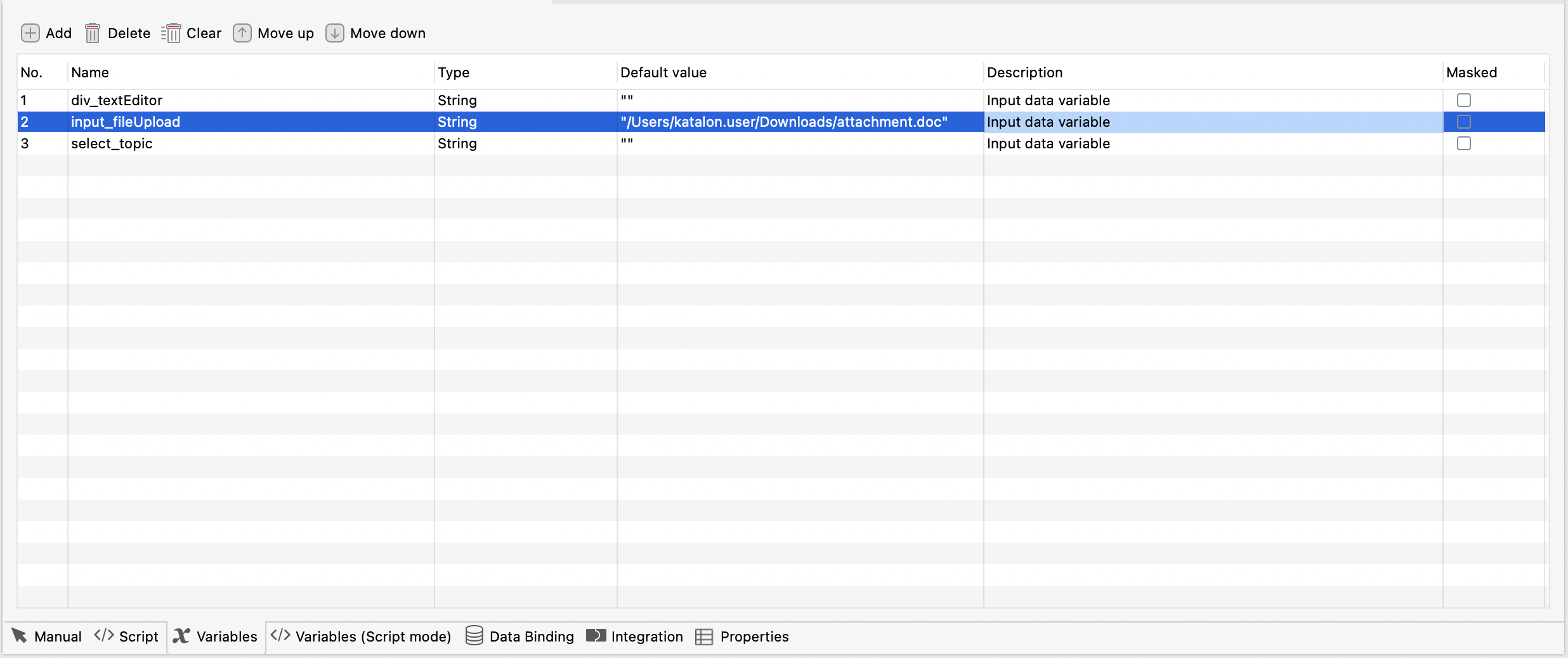
Go to the Variables tab.
-
Locate the
input_fileUploadvariable. -
In the Default value cell, enter the absolute path to the file on the execution machine.
Alternatively, define the file path directly in script following this format.
WebUI.uploadFile(findTestObject('AI-Generated/TI/Page_customer_support_request_form/input_fileUpload'), RunConfiguration.getProjectDir() + File.separator + 'attachment.pdf')