Custom keywords best practices
This document explains the best practices when creating custom keywords.
Scenario
-
Code Duplication: Eliminating copy-pasting across Test Cases.
-
Readability: Making Test Cases clean and business-focused.
-
Maintainability: Only modifying the business logic in one central place (the Keyword).
Purpose and strategic value
Definition: Groovy/Java functions packaged to be called just like built-in Katalon Keywords (e.g., WebUI.click).
Key takeaways
-
Syntax Requirement: The
@KeywordSyntax is the essential annotation required before the method to enable Katalon recognition. -
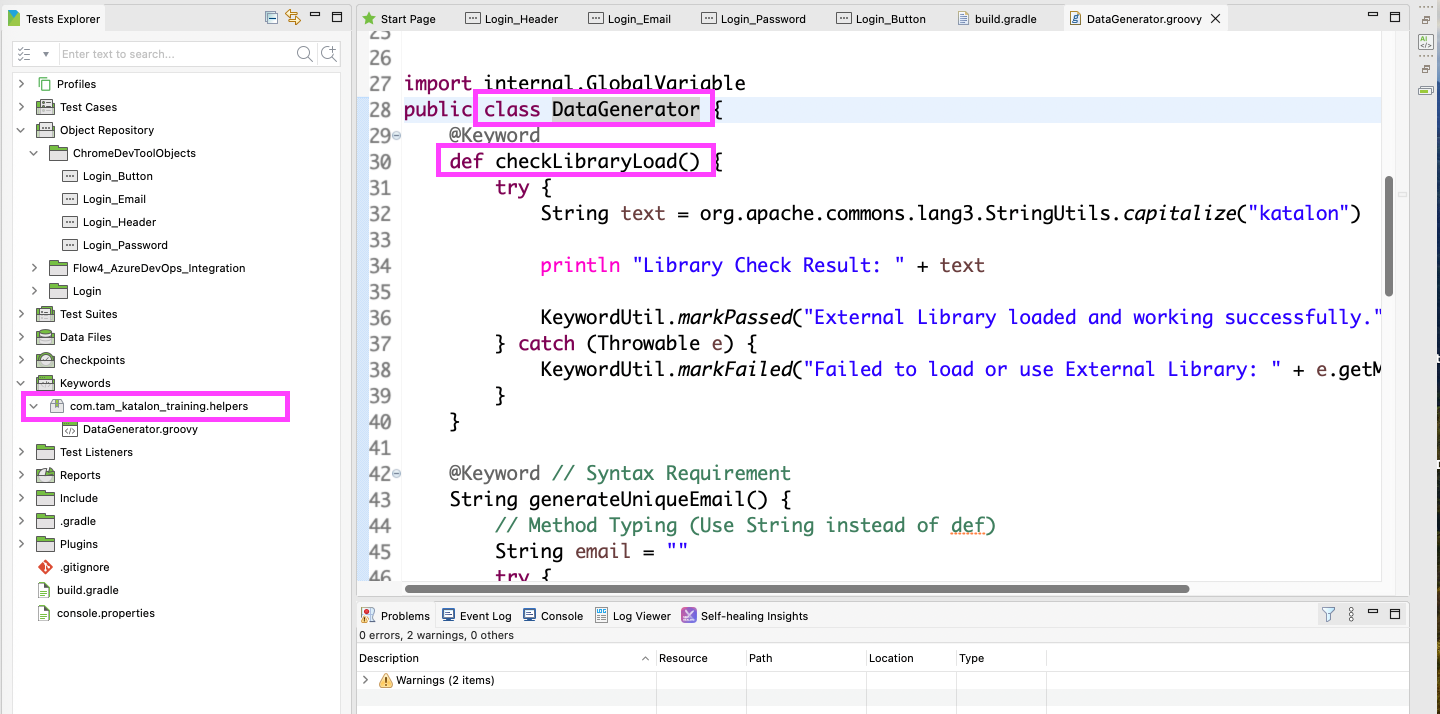
Standard Naming: Always follow Naming Conventions for defining Package (all lowercase, reversed domain name) and Class (PascalCase) names to ensure uniqueness and organization.
-
Single Responsibility: Keywords must Perform one specific action (e.g.,
safeClick,generateData) and should NOT contain assertion logic; assertions belong in the Test Case. -
Error Management: Utilize the
try-catchblock to prevent Test Cases from crashing due to technical errors. -
Logging: Integrate
KeywordUtil(markPassed/markFailed/logInfo) to report the status of the action clearly in the Log Viewer. -
Method Typing: While
defis acceptable for Void Functions (e.g., logging), it should be avoided for Returning Data functions; use explicit types (e.g.,String) for clarity and maintainability.
Requirements
Naming Conventions: Best practices for defining Package and Class names (e.g., com.myproject.helpers, com.myproject.dataHandlers).
The @Keyword Syntax: The essential annotation required before the method to enable Katalon recognition.
Naming Convention
| Element | Convention | Example |
|---|---|---|
| Package | All lowercase, separated by dots, usually starting with a reversed domain name. | com.myproject.ui.actions |
| Class | PascalCase (First letter of every word capitalized). | SafeActions, DataGenerator |
| Method/Keyword | camelCase (First word lowercase, first letter of subsequent words capitalized). | safeClick(), generateUniqueEmail() |
Best practices steps
Separation of concerns
What Keywords should do: Perform one specific action (e.g., safeClick, generateData).
What Keywords should NOT do: They should NOT contain assertion logic; assertions belong in the Test Case.
Professional error handling
-
Using the
try-catchblock to prevent Test Cases from crashing due to technical errors. -
Integrating
KeywordUtil(markPassed/markFailed/logInfo) to report the status of the action clearly in the Log Viewer.
Method definition
| Purpose | Use def? | Recommended Example | Rationale |
|---|---|---|---|
| Returning Data (e.g., generating an email) | Should be avoided. | String generateEmail() | Readability: Clearly states the function's contract, making code easier to read and maintain for others. |
| Void Functions (e.g., logging) | Acceptable. | void logMessage() or def logMessage() | There is minimal risk since no critical data value is being passed back. |
Conclusion
Custom Keywords are the cornerstone of writing professional, scalable, and maintainable automation code in Katalon Studio. By adhering to the principles of Separation of Concerns, implementing Professional Error Handling, and strictly following Naming Conventions, automation teams can significantly reduce Code Duplication and improve Maintainability. The strategic value of Custom Keywords lies in transforming complex test logic into clean, business-focused Test Cases, allowing the automation suite to easily adapt to changes in the underlying application
See all best practice documents at Katalon products best practices.