Invalid 'tools': array too long
Last updated: April 2026
When you work with Katalon AI Assistant, you may get the error Invalid 'tools': array too long or this error log:
com.kms.katalon.ai.core.model.exception.Katalon AI AssistantLlmApiRuntimeException:
INVALID_ARGUMENT:
com.katalon.gpt.extension.api.gpt.ApiInvalidRequestException: com.azure.core.exception.HttpResponseException: Status code 400, "{ "error": { "message": "Invalid 'tools': array too long. Expected an array with maximum length 128, but got an array with length 129 instead.", "type": "invalid_request_error", "param": "tools", "code": "array_above_max_length" } }"
Cause
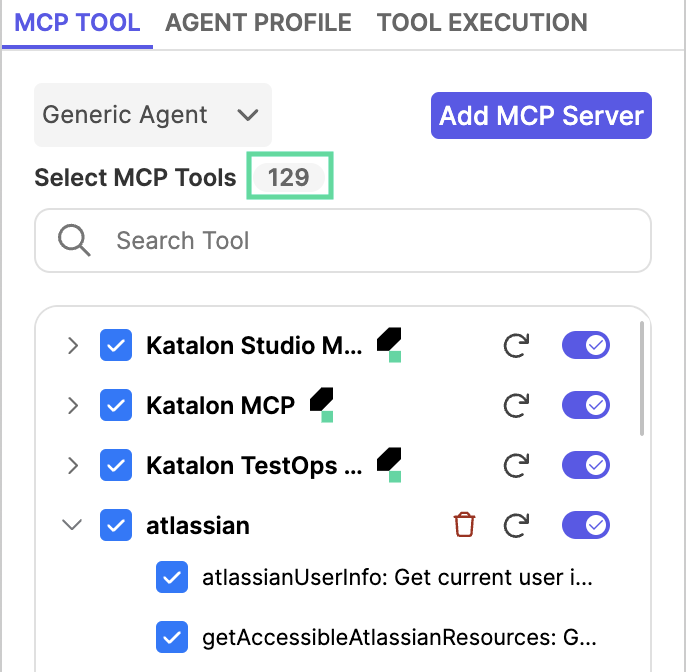
Some AI service providers like OpenAI enforce a limit of 128 MCP tools per request. Exceeding this limit by enabling more than 128 tools causes this error:
Remedy
Disable tools you don't need.
- Go to Agent mode settings menu.
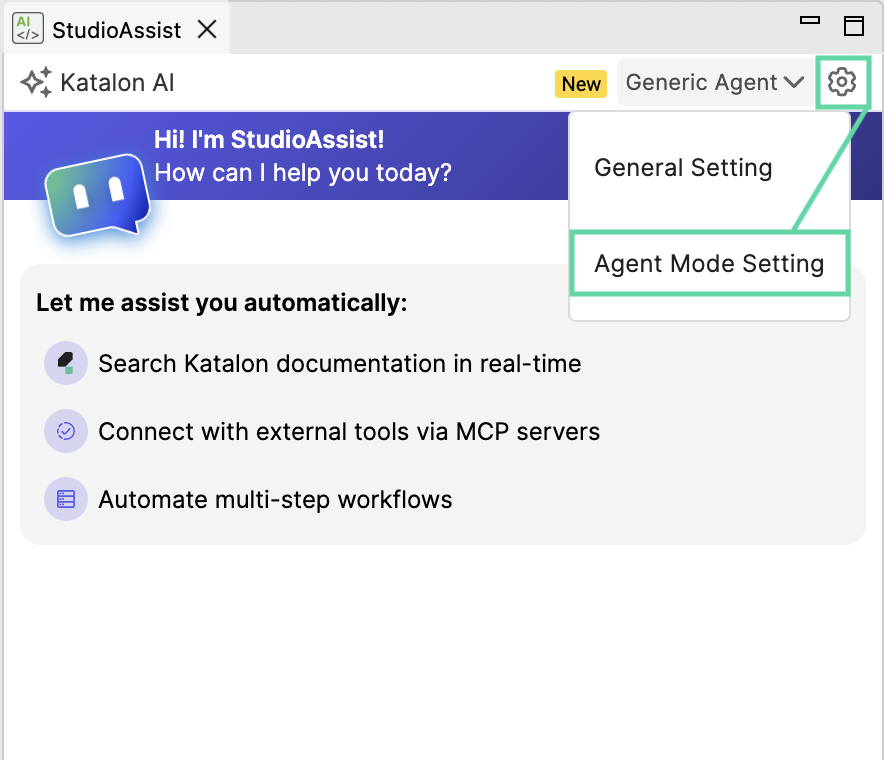
- In MCP Tool tab, find and disable the tools you don't need (3), or disable a whole MCP server (2). Your progress will be auto-saved.

- Close the settings menu, and try again.