API testing best practices: Scripting standards
This document shows the best practices to API testing in Katalon Studio, to assure tests don't just pass, but also are properly validated.
Scenario:
A QA team runs a regression suite of 500 API tests. Every test passes with green checks because they only verify Status Code: 200 OK. However, the production application begins crashing.
Investigation reveals the API silently changed a user_id field from an Integer (123) to a String ("123"). The existing API tests missed this "silent failure" because they lacked Deep Contract/Schema Validation.
This guide aims to elevate API testing, from simple "Connectivity Checks" (Is the server up?) to Contract & Logic Validation (Is the data correct?).
Key Takeaways
- 200 OK is Not Enough: A successful connection does not equal valid data.
- Validate the Schema: Use JSON Schema validation to enforce strict data types (String vs. Integer).
- Verify Values: Use assertions to confirm specific business logic (e.g.,
inventory > 0). - Monitor Latency: Fail tests if the API response time exceeds the SLA (e.g., >2000ms).
Best practices steps for API testing
- JSON Schema Files: Prepare
.jsonschema files for your critical endpoints and store them in a project folder (e.g.,/Schemas). - Katalon Studio version 10.x or higher (recommended for latest keyword support).
In this example, we are using this API Endpoint: https://sample-web-service-aut.herokuapp.com/api/users/7.
You can choose pattern A, B, or C to follow through, for different validation purposes.
This pattern provides stability, detecting silent breaking changes in the API structure. Use it on all GET requests and critical data retrieval endpoints.
Pattern A: Deep contract validation (schema)
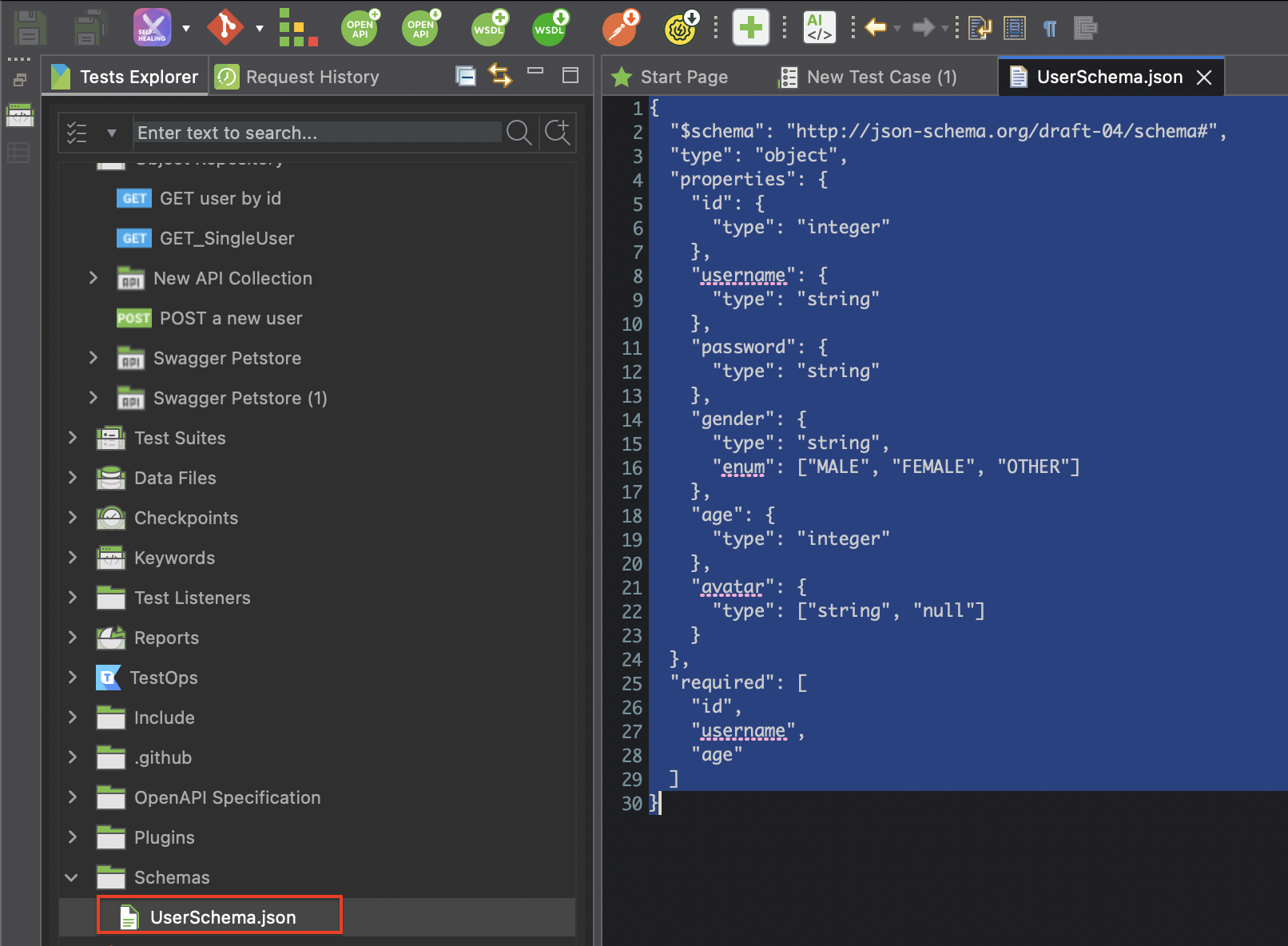
- Create the Schema File:
- Create a folder named
Schemasin your Katalon Project Root. - Create a new file (e.g.,
UserResponseSchema.json) and paste your expected JSON structure for the API Request:
- Create a folder named
- Write the Validation Script:
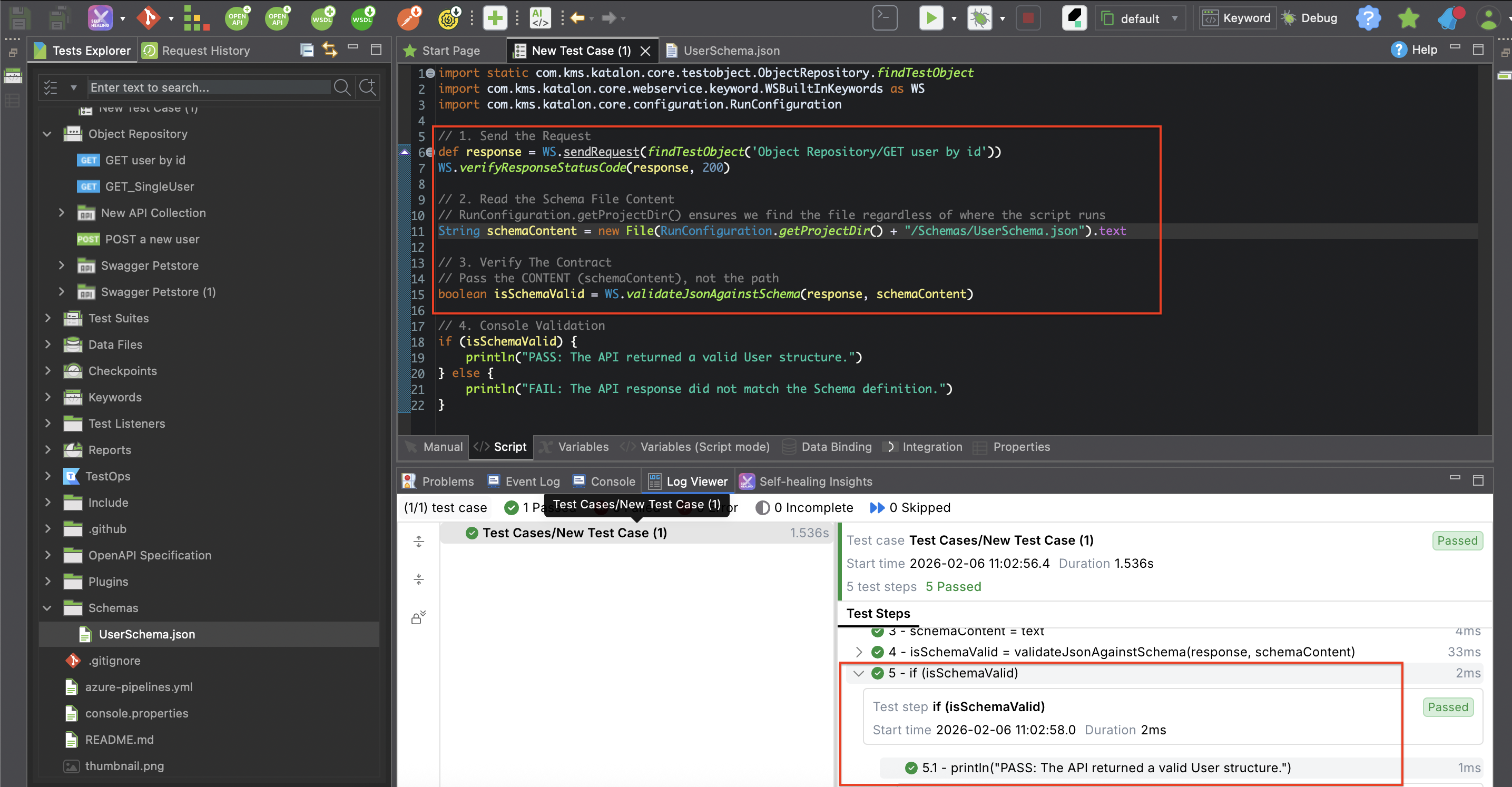
- In your Test Case, use the script below. Note that you must read the file's content string, not just pass the file path.
import com.kms.katalon.core.configuration.RunConfiguration
import com.kms.katalon.core.webservice.keyword.WSBuiltInKeywords as WS

// 1. Send Request
def response = WS.sendRequest(findTestObject('Object Repository/User/GET_User_ById'))

// 2. Read the Schema File Content
// We use RunConfiguration.getProjectDir() to ensure the path is correct across all environments
String schemaPath = RunConfiguration.getProjectDir() + "/Schemas/UserResponseSchema.json"
String schemaContent = new File(schemaPath).text

// 3. Validate Response against Schema Content
boolean isMatch = WS.validateJsonAgainstSchema(response, schemaContent)

// 4. Assert
if (!isMatch) {
    KeywordUtil.markFailed("Response did not match the Schema contract.")
}
The validateJsonAgainstSchema keyword expects the JSON content string as the second argument, not the file path. Always use .text to read the file first.
- Outcome:
Pattern B: Standard verification (status & headers)
This pattern is the standard verification for status and headers, minimum requirement for any API test. Use it on every single request.
- Add Status Check:
- Immediately after your
sendRequestline, add the status verification.
- Immediately after your
// 1. Verify Status Code
// Common Codes: 200 (OK), 201 (Created), 204 (No Content) WS.verifyResponseStatusCode(response, 200)
Note: For negative testing (e.g., "Login with bad password"), change the expected status code to 401 or 403
- Add Content-Type Check:
- Since
Content-Typeis a Header, we must useresponse.getHeaderFields()instead of a keyword.
- Since
// 2. Verify Content-Type Header
// We grab the headers map and check if 'Content-Type' contains 'json'
def headers = response.getHeaderFields()

// Check if header exists AND contains 'application/json' (ignoring charset details)
if (!headers['Content-Type'].toString().contains('application/json')) {
    KeywordUtil.markFailed("Invalid Content-Type. Expected JSON but found: " + headers['Content-Type'])
}
If you want to check for a root element in the body instead of a header:
// Verify that the 'id' field exists in the body, confirming valid JSON was received
WS.verifyElementPropertyValue(response, 'id', 7)
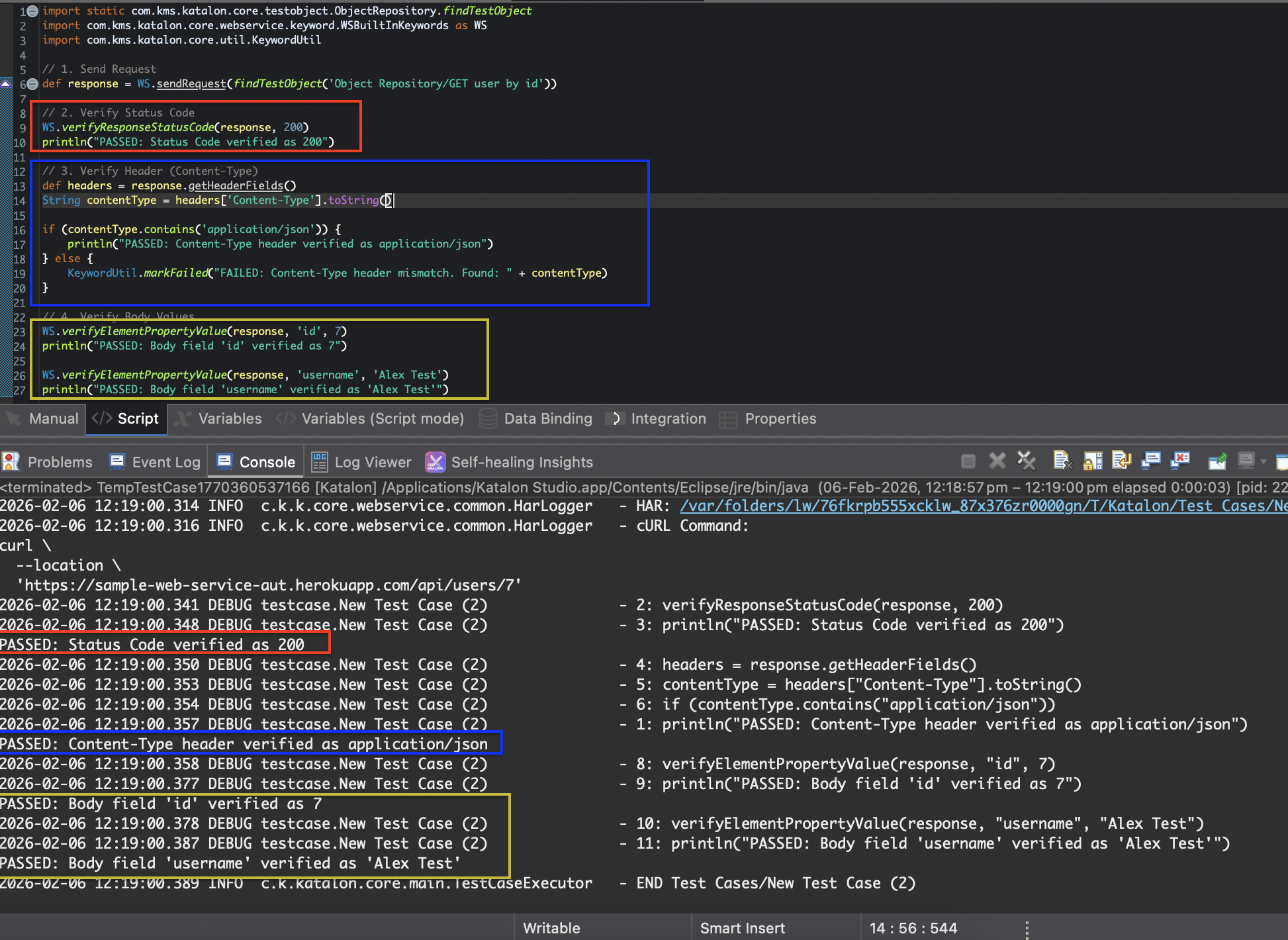
- Example Script:
import static com.kms.katalon.core.testobject.ObjectRepository.findTestObject
import com.kms.katalon.core.webservice.keyword.WSBuiltInKeywords as WS
import com.kms.katalon.core.util.KeywordUtil


// 1. Send Request
def response = WS.sendRequest(findTestObject('Object Repository/GET user by id'))


// 2. Verify Status Code
WS.verifyResponseStatusCode(response, 200)
println("PASSED: Status Code verified as 200")


// 3. Verify Header (Content-Type)
def headers = response.getHeaderFields()
String contentType = headers['Content-Type'].toString()


if (contentType.contains('application/json')) {
	println("PASSED: Content-Type header verified as application/json")
} else {
	KeywordUtil.markFailed("FAILED: Content-Type header mismatch. Found: " + contentType)
}


// 4. Verify Body Values
WS.verifyElementPropertyValue(response, 'id', 7)
println("PASSED: Body field 'id' verified as 7")


WS.verifyElementPropertyValue(response, 'username', 'Alex Test')
println("PASSED: Body field 'username' verified as 'Alex Test'")
- Outcome:
Pattern C: Business logic verification (values)
Going beyond simple equality checks to enforce business rules.
When to use: When you don't know the exact value (e.g., a random ID) but need to verify it follows a format or rule.
We have two primary ways to implement this, depending on whether you are checking Text (Strings) or Math (Numbers/Lists).
- Approach 1
- Approach 2
Approach 1: The "Native Keyword" Way (Best for Text & Exact Matches)
Use this for standard checks like "Does the username match?" or "Does the email contain an @ symbol?" without writing complex code.
- Check for Exact Match:
- Use
WS.verifyElementPropertyValueto check if a specific JSON field exactly matches a value.
- Use
import com.kms.katalon.core.webservice.keyword.WSBuiltInKeywords as WS

// Check if 'username' is exactly 'Alex Test' inside the JSON body
WS.verifyElementPropertyValue(response, 'username', 'Alex Test')
- Check for Partial Match (Contains):
- Use
WS.verifyMatchwith Regular Expressions (Regex) to check patterns (e.g., "Contains").
- Use
// 1. Get the value of the specific field
String emailValue = WS.getElementPropertyValue(response, 'email')

// 2. Verify it contains "@" using Regex
// Syntax: WS.verifyMatch(actualValue, expectedRegex, isRegex)
// Regex ".@." means: any text, followed by @, followed by any text
WS.verifyMatch(emailValue, '.@.', true)

println("PASSED: Email field contains '@'")
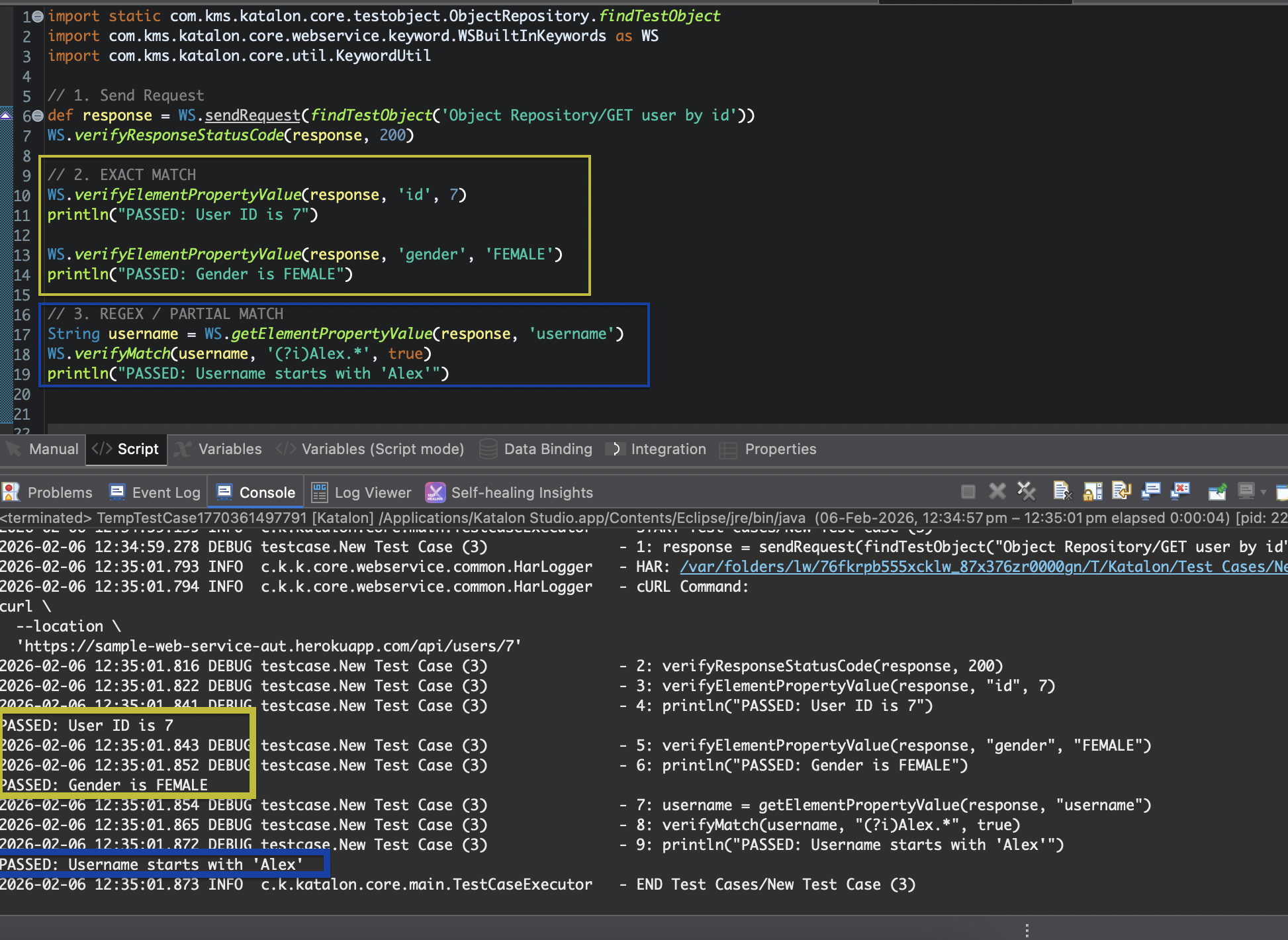
- Example Script:
import static com.kms.katalon.core.testobject.ObjectRepository.findTestObject
import com.kms.katalon.core.webservice.keyword.WSBuiltInKeywords as WS
import com.kms.katalon.core.util.KeywordUtil


// 1. Send Request
def response = WS.sendRequest(findTestObject('Object Repository/GET user by id'))
WS.verifyResponseStatusCode(response, 200)

// 2. EXACT MATCH
WS.verifyElementPropertyValue(response, 'id', 7)
println("PASSED: User ID is 7")

WS.verifyElementPropertyValue(response, 'gender', 'FEMALE')
println("PASSED: Gender is FEMALE")

// 3. REGEX / PARTIAL MATCH
String username = WS.getElementPropertyValue(response, 'username')
WS.verifyMatch(username, '(?i)Alex.*', true)
println("PASSED: Username starts with 'Alex'")
- Outcome:
Approach 2: The "Groovy Script" Way (Best for Math & Lists)
- Parse the Response:
- Convert the raw JSON text into a Groovy object so you can perform math on it.
import groovy.json.JsonSlurper

// Parse the response text into a usable object
def jsonSlurper = new JsonSlurper()
def jsonResponse = jsonSlurper.parseText(response.getResponseText())
- Assert Math Logic:
- Use Groovy assertions to enforce numeric rules.
// Check 1: Numeric Logic (Age must be 18 or older)
assert jsonResponse.age >= 18 : "FAILED: User is underage (" + jsonResponse.age + ")"
println("PASSED: User is 18+")

// Check 2: List Logic (Verify 'avatars' list is not empty)
if (jsonResponse.avatars.size() == 0) {
    KeywordUtil.markFailed("LOGIC ERROR: User has no avatars!")
}
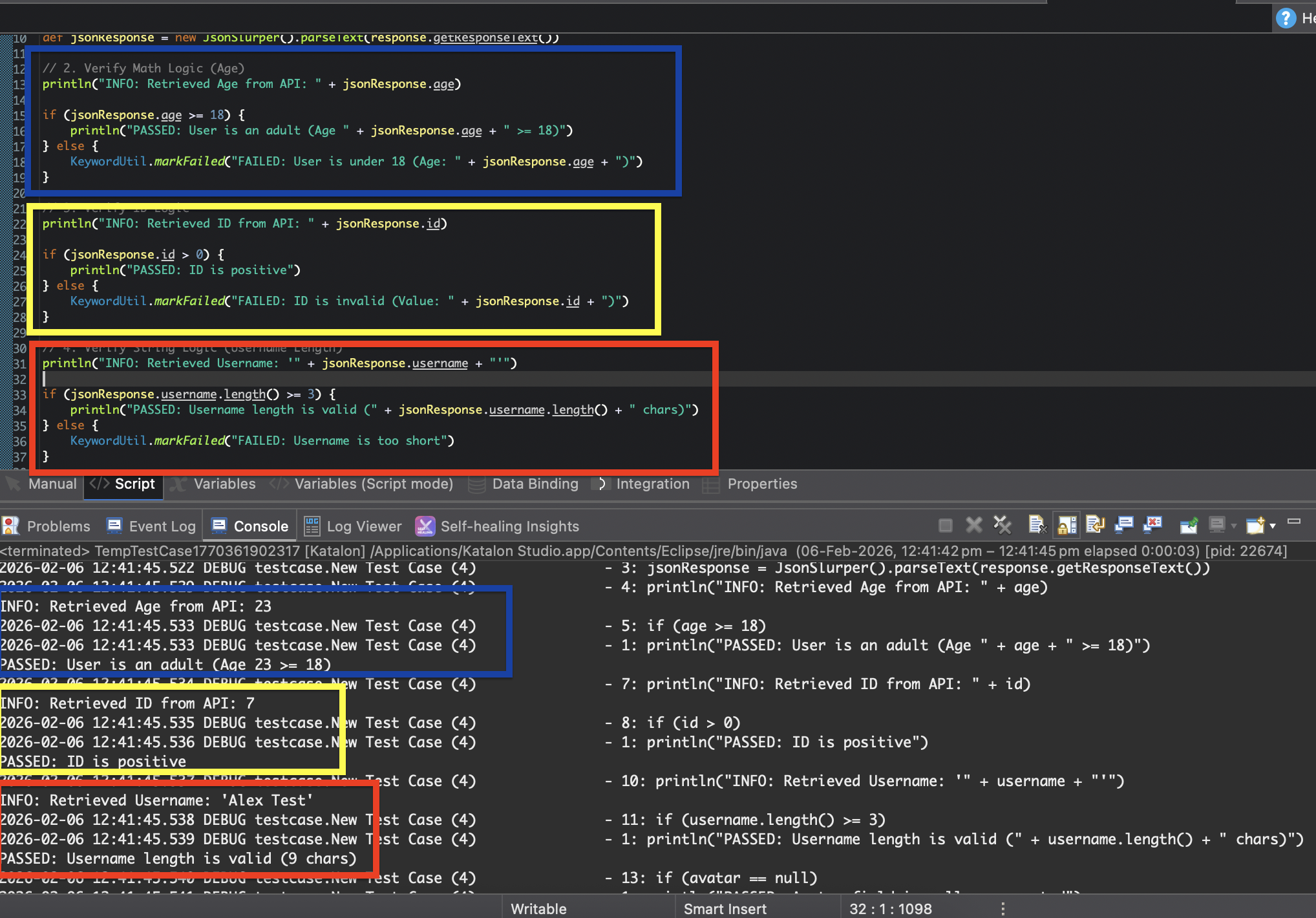
- Example Script:
import static com.kms.katalon.core.testobject.ObjectRepository.findTestObject
import com.kms.katalon.core.webservice.keyword.WSBuiltInKeywords as WS
import com.kms.katalon.core.util.KeywordUtil
import groovy.json.JsonSlurper

// 1. Send Request & Parse
def response = WS.sendRequest(findTestObject('Object Repository/GET user by id'))
WS.verifyResponseStatusCode(response, 200)

def jsonResponse = new JsonSlurper().parseText(response.getResponseText())

// 2. Verify Math Logic (Age)
println("INFO: Retrieved Age from API: " + jsonResponse.age)

if (jsonResponse.age >= 18) {
    println("PASSED: User is an adult (Age " + jsonResponse.age + " >= 18)")
} else {
    KeywordUtil.markFailed("FAILED: User is under 18 (Age: " + jsonResponse.age + ")")
}

// 3. Verify ID Logic
println("INFO: Retrieved ID from API: " + jsonResponse.id)

if (jsonResponse.id > 0) {
    println("PASSED: ID is positive")
} else {
    KeywordUtil.markFailed("FAILED: ID is invalid (Value: " + jsonResponse.id + ")")
}

// 4. Verify String Logic (Username Length)
println("INFO: Retrieved Username: '" + jsonResponse.username + "'")

if (jsonResponse.username.length() >= 3) {
    println("PASSED: Username length is valid (" + jsonResponse.username.length() + " chars)")
} else {
    KeywordUtil.markFailed("FAILED: Username is too short")
}

// 5. Verify Null Logic
if (jsonResponse.avatar == null) {
    println("PASSED: Avatar field is null as expected")
} else {
    println("INFO: Avatar field has value: " + jsonResponse.avatar)
}
- Outcome:
Pattern D: Response time assertion (performance)
When to use: SLAs: When you have a strict Service Level Agreement (e.g., "All APIs must respond within 2000ms").
- Define the SLA Limit:
- Decide on your threshold (e.g., 2000ms).
- Measure and Assert:
- Use
.getElapsedTime()on the response object. - Use a simple
ifcondition to compare the Actual Time vs. the Limit.
- Use
- Choose Failure Type:
- Hard Fail: Use
markFailed()if performance is critical (stops the test). - Soft Warning: Use
markWarning()if you just want to track it without stopping the pipeline (recommended for Staging).
- Hard Fail: Use
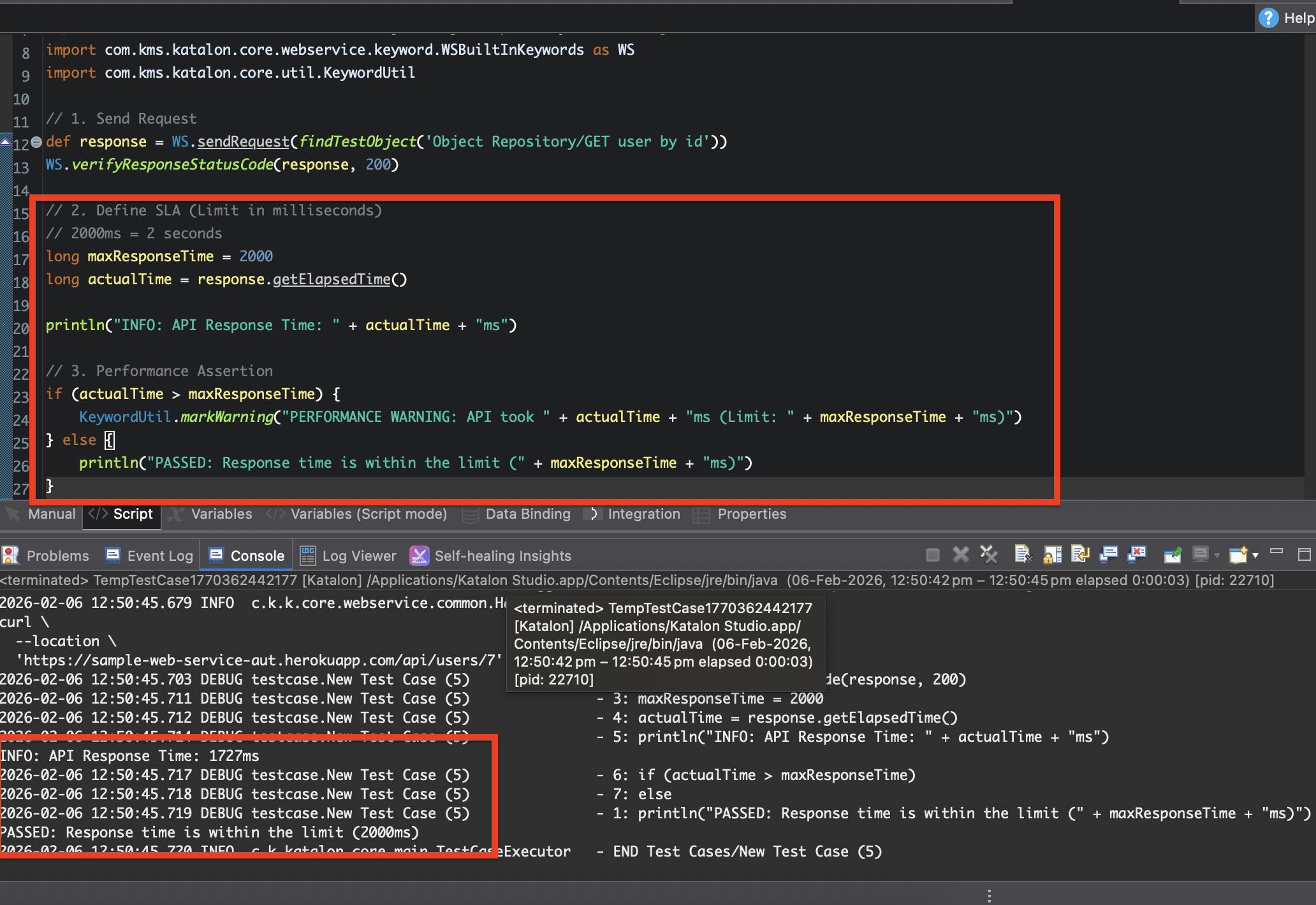
- Example Script:
import static com.kms.katalon.core.testobject.ObjectRepository.findTestObject
import com.kms.katalon.core.webservice.keyword.WSBuiltInKeywords as WS
import com.kms.katalon.core.util.KeywordUtil

// 1. Send Request
def response = WS.sendRequest(findTestObject('Object Repository/GET user by id'))
WS.verifyResponseStatusCode(response, 200)

// 2. Define SLA (Limit in milliseconds)
// 2000ms = 2 seconds
long maxResponseTime = 2000
long actualTime = response.getElapsedTime()

println("INFO: API Response Time: " + actualTime + "ms")

// 3. Performance Assertion
if (actualTime > maxResponseTime) {
	KeywordUtil.markWarning("PERFORMANCE WARNING: API took " + actualTime + "ms (Limit: " + maxResponseTime + "ms)")
} else {
	println("PASSED: Response time is within the limit (" + maxResponseTime + "ms)")
}
- Outcome:
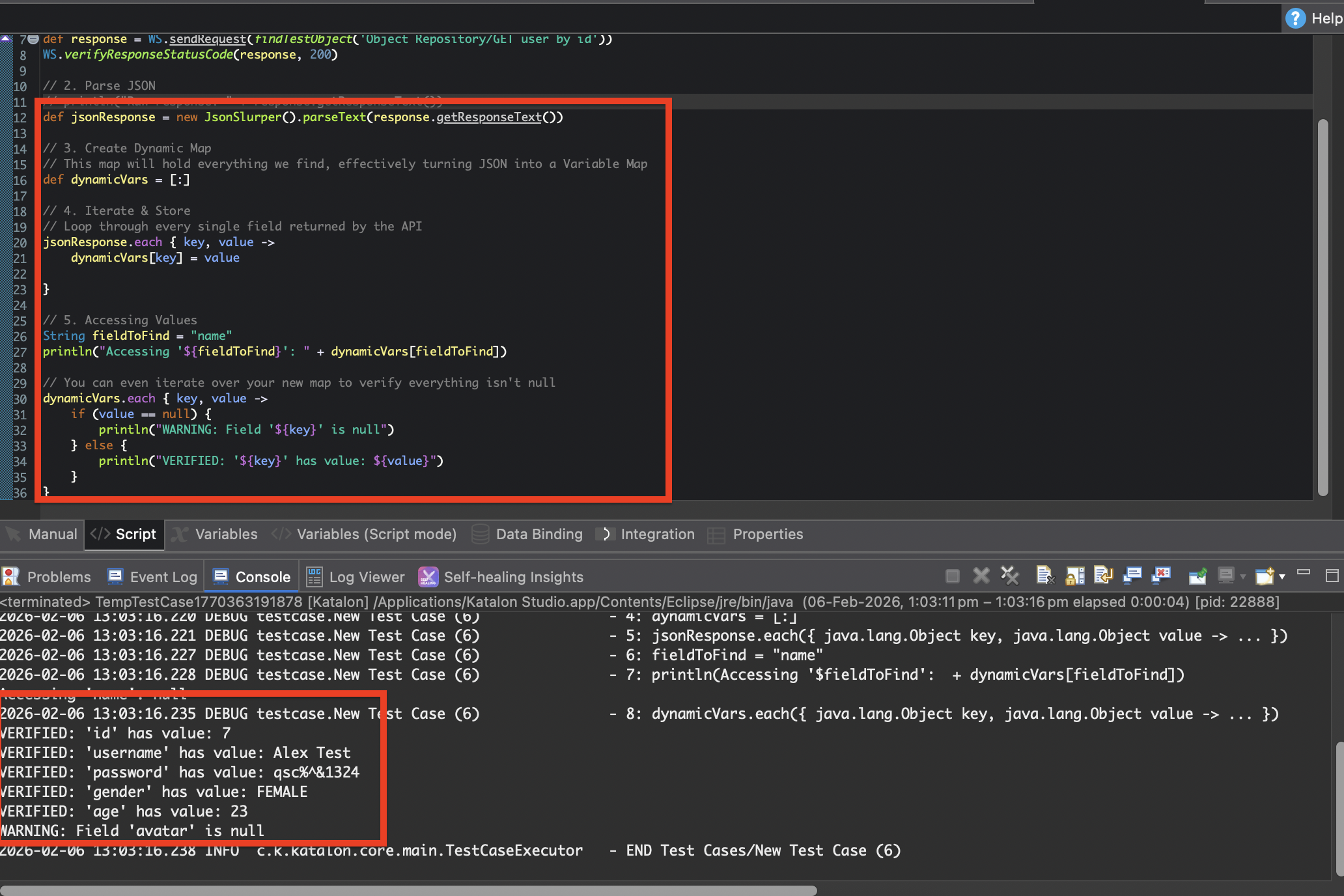
Pattern E: Dynamic response handling
Handling unknown or variable response fields dynamically.
When to use: When you want to grab all data from a creation request (POST) and dump it into a report or database.
-
Parse the Response:
- Convert the raw text into a Groovy object using
JsonSlurper.
- Convert the raw text into a Groovy object using
-
Create a Dynamic Map:
- Define an empty Map
[:]to act as your flexible container.
- Define an empty Map
-
Iterate and Store:
- Loop through every key-value pair in the response and shove it into your map.
-
Access Dynamically:
- Retrieve values using the key string (e.g.,
map['id']) instead of hardcoded dot notation.
- Retrieve values using the key string (e.g.,
-
Example Script:
import com.kms.katalon.core.webservice.keyword.WSBuiltInKeywords as WS
import static com.kms.katalon.core.testobject.ObjectRepository.findTestObject
import com.kms.katalon.core.webservice.keyword.WSBuiltInKeywords as WS
import groovy.json.JsonSlurper

// 1. Send Request
def response = WS.sendRequest(findTestObject('Object Repository/GET user by id'))
WS.verifyResponseStatusCode(response, 200)

// 2. Parse JSON
// println("Raw response: " + response.getResponseText())
def jsonResponse = new JsonSlurper().parseText(response.getResponseText())

// 3. Create Dynamic Map
// This map will hold everything we find, effectively turning JSON into a Variable Map
def dynamicVars = [:]

// 4. Iterate & Store
// Loop through every single field returned by the API
jsonResponse.each { key, value ->
	dynamicVars[key] = value
	// println("Stored Dynamic Variable -> [${key}] : ${value}")
}

// 5. Accessing Values
String fieldToFind = "name"
println("Accessing '${fieldToFind}': " + dynamicVars[fieldToFind])

// You can even iterate over your new map to verify everything isn't null
dynamicVars.each { key, value ->
	if (value == null) {
		println("WARNING: Field '${key}' is null")
	} else {
		println("VERIFIED: '${key}' has value: ${value}")
	}
}
- Outcome: