Check element state with isElement and assertElement keywords
Scope and supported versions
Use isElement* to branch on an element state and assertElement* to mark a checkpoint. This page covers WebUI tests in Katalon Studio 11.2.0 and later and Mobile tests on Android and iOS in 11.7.0 and later. Find the Mobile keywords under Built-in Keywords > Mobile > Element.
The new keywords do not use classic or AI self-healing. Existing verify* and waitFor* keywords remain supported.
Choose the right keyword
Start with one question: if the element is not in the expected state, has the test failed?
| If the answer is... | Use | Returns | When the condition is not met |
|---|---|---|---|
| Yes, the test has failed | assertElement* | No value to use | The step fails, based on the failure handling you set |
| No, the test just takes a different path | isElement* | true or false | Returns false. The step still passes |
You can keep using the verify* and waitFor* keywords in existing tests. They are still supported. For new tests, we recommend isElement* and assertElement* because they behave the same way every time, whatever failure handling you set.
isElement* and assertElement* keywords do not use self-healing, classic or AI. If a step needs self-healing to recover from a broken locator, keep using the verify* or waitFor* keyword for that step. See Self-healing.
See Move from verify and waitFor keywords.
Available keywords by platform
| State | WebUI | Mobile |
|---|---|---|
| Present / Not present | isElementPresent, isElementNotPresent, assertElementPresent, assertElementNotPresent | Same names under Mobile |
| Visible / Not visible | isElementVisible, isElementNotVisible, assertElementVisible, assertElementNotVisible | Same names under Mobile |
| Checked / Not checked | isElementChecked, isElementNotChecked, assertElementChecked, assertElementNotChecked | Same names under Mobile; supports iOS UISwitch controls in 11.7.0 |
| Has / Does not have attribute | isElementHasAttribute, isElementNotHasAttribute, assertElementHasAttribute, assertElementNotHasAttribute | Same names under Mobile |
| Attribute value | isElementAttributeValue, assertElementAttributeValue | Same names under Mobile |
| Text | isElementText, assertElementText | Same names under Mobile |
| Clickable / Not clickable | isElementClickable, isElementNotClickable, assertElementClickable, assertElementNotClickable | Not available; check the enabled attribute when appropriate |
| In viewport / Not in viewport | isElementInViewport, isElementNotInViewport; no assertElementInViewport | Not available |
Mobile keyword description pages are not yet available in this repository; find the Mobile keywords in the built-in keyword browser.
How the keywords work
Parameters
Both platforms use these core parameters. The Web signature names the timeout timeOut; Mobile names it timeout.
| Parameter | Type | Required | Description |
|---|---|---|---|
to | TestObject | Yes | The Web test object to check. For Mobile, use a Mobile test object. |
timeOut | int | Yes | The maximum time to wait, in seconds. A negative value uses the platform default element timeout in project execution settings. The Mobile keywords also accept 0 to check once without waiting. |
flowControl | FailureHandling | No | What happens on failure: STOP_ON_FAILURE, CONTINUE_ON_FAILURE, or OPTIONAL. Uses the project default if you leave it out. |
Some keywords need an expected value as well:
*HasAttributeand*NotHasAttributetakeattributeName.*AttributeValuetakesattributeNameandattributeValue.*TexttakesexpectedText.
Waiting and timeouts
The keywords check the condition repeatedly until it is met or the timeout runs out:
- If the condition is met, the keyword returns right away.
- If the condition is never met, the keyword waits for the full timeout, then returns
false(isElement*) or fails the step (assertElement*).
This means an isElement* keyword that returns false always takes the full timeout. Keep timeouts short when a false result is common. See Keep isElement timeouts short.
Negative states need the element to exist
Not* keywords, such as assertElementNotVisible (both platforms) or isElementNotClickable (Web only), first find the element, then check that it is not in the given state. A missing element does not count as "not visible" or "not clickable." In that case:
isElementNot*returnsfalse.assertElementNot*fails.
To check that an element is gone from the page, use isElementNotPresent or assertElementNotPresent.
Failure handling
assertElement*: failure handling decides what happens when the condition is not met.STOP_ON_FAILUREstops the test,CONTINUE_ON_FAILUREmarks the step as failed and continues, andOPTIONALlogs a warning and continues.isElement*: a condition that is not met returnsfalseand the step passes. Failure handling applies only to unexpected errors, such as an invalid locator, a closed browser, or no running mobile application. If the test continues after such an error, the keyword returnsfalse.
Self-healing
isElement* and assertElement* keywords do not use self-healing, classic or AI. If the locator of a test object is broken, the keyword does not try other locators:
isElement*returnsfalse.assertElement*fails the step.
This is by design. A state check that silently heals to a different element can pass when it should fail, so these keywords report exactly what the locator finds.
For Web, verify* and waitFor* are excluded from classic self-healing by default, but you can remove them from the exclusion list in Project Settings > Self-Healing. For Mobile, legacy keywords can use self-healing when enabled for the project. If your tests rely on self-healing for these checks, keep using verify* and waitFor* for those steps.
An upcoming release will update the verify* and waitFor* keywords so that they behave more consistently, while keeping self-healing support. This update may change how some existing tests behave. We will share details in the release notes.
Text matching
isElementText and assertElementText compare the element text exactly. For Flutter web elements (tag names that start with flt-), an exact match on the aria-label attribute also counts.
Mobile locator and state notes
Mobile keywords use the active Android or iOS driver and the locator of a Mobile test object. Platform-specific locators, such as Android UiAutomator and iOS predicate strings, require a matching device. A locator for the other platform is an unexpected error, handled according to flowControl. Image locators are supported.
Mobile has no *Clickable or *InViewport keywords. To check whether a control is enabled, compare its enabled attribute. Mobile *HasAttribute treats an empty attribute value as present. Mobile checked-state keywords support iOS UISwitch controls in 11.7.0; check other control types on your target driver. Mobile text and attribute-value comparisons are exact and case-sensitive, without trimming.
The Mobile assertElement* result is reported through the step status. Do not branch on its return value; use isElement* for a Boolean result.
Examples
- Web
- Mobile
Add a checkpoint
Fail the test if the order confirmation does not appear, or the total is wrong:
WebUI.click(findTestObject('Checkout/btn_PlaceOrder'))

WebUI.assertElementVisible(findTestObject('Checkout/lbl_OrderConfirmed'), 10)
WebUI.assertElementText(findTestObject('Checkout/lbl_Total'), '$42.00', 10)
Handle an optional element
Close a cookie banner only if it shows up:
if (WebUI.isElementVisible(findTestObject('Home/btn_AcceptCookies'), 3)) {
    WebUI.click(findTestObject('Home/btn_AcceptCookies'))
}
Wait for a loading indicator to go away
Pick the keyword based on how your app hides the indicator:
// The spinner is removed from the page
WebUI.assertElementNotPresent(findTestObject('Common/spinner'), 30)

// The spinner stays in the page but is hidden (for example, display: none)
WebUI.assertElementNotVisible(findTestObject('Common/spinner'), 30)
If you are not sure which one applies, use assertElementNotPresent. assertElementNotVisible fails when the element no longer exists.
Check that a button stays disabled
Confirm that Submit cannot be clicked until the form is valid:
WebUI.assertElementNotClickable(findTestObject('Signup/btn_Submit'), 5)

WebUI.setText(findTestObject('Signup/txt_Email'), 'tester@example.com')
WebUI.setText(findTestObject('Signup/txt_Password'), 'Str0ngPass!')

WebUI.assertElementClickable(findTestObject('Signup/btn_Submit'), 5)
Check an attribute
// The tab is marked as active
WebUI.assertElementAttributeValue(findTestObject('Nav/tab_Reports'), 'aria-selected', 'true', 5)

// The field is no longer read-only
WebUI.assertElementNotHasAttribute(findTestObject('Profile/txt_Name'), 'readonly', 5)
Check a checkbox
WebUI.click(findTestObject('Signup/chk_AcceptTerms'))
WebUI.assertElementChecked(findTestObject('Signup/chk_AcceptTerms'), 5)
Report a failure and keep going
Use CONTINUE_ON_FAILURE to check several things in one run:
WebUI.assertElementVisible(findTestObject('Dashboard/widget_Revenue'), 10, FailureHandling.CONTINUE_ON_FAILURE)
WebUI.assertElementVisible(findTestObject('Dashboard/widget_Users'), 10, FailureHandling.CONTINUE_ON_FAILURE)
Assert that an element is in the viewport
There is no assertElementInViewport keyword. Use isElementInViewport with a Groovy assert:
WebUI.scrollToElement(findTestObject('Footer/lnk_Contact'), 5)
assert WebUI.isElementInViewport(findTestObject('Footer/lnk_Contact'), 5)
Add a checkpoint
Mobile.tap(findTestObject('Checkout/btn_PlaceOrder'), 10)
Mobile.assertElementVisible(findTestObject('Checkout/lbl_OrderConfirmed'), 10)
Mobile.assertElementText(findTestObject('Checkout/lbl_Total'), '$42.00', 10)
Handle an optional element
if (Mobile.isElementVisible(findTestObject('Home/btn_AllowNotifications'), 3)) {
    Mobile.tap(findTestObject('Home/btn_AllowNotifications'), 3)
}
Wait for an indicator to disappear
// The indicator is removed.
Mobile.assertElementNotPresent(findTestObject('Common/spinner'), 30)

// The indicator remains but is hidden.
Mobile.assertElementNotVisible(findTestObject('Common/spinner'), 30)
assertElementNotVisible fails when the element no longer exists.
Check an enabled attribute
Mobile has no *Clickable keyword. Check enabled when that attribute is supported by your device driver:
Mobile.assertElementAttributeValue(findTestObject('Signup/btn_Submit'), 'enabled', 'false', 5)
Mobile.setText(findTestObject('Signup/txt_Email'), 'tester@example.com', 10)
Mobile.assertElementAttributeValue(findTestObject('Signup/btn_Submit'), 'enabled', 'true', 5)
Check an Android attribute
Mobile.assertElementHasAttribute(findTestObject('Profile/img_Avatar'), 'content-desc', 5)
Attribute names depend on the platform driver; use an iOS attribute such as label for an iOS test object.
Best practices
Use assertElement for checkpoints, not verify plus custom logic
You no longer need to wrap a verify* keyword in an if statement and call KeywordUtil.markFailed(). An assertElement* keyword fails the step for you and logs a clear message.
Use isElement for branching, not verify with OPTIONAL
verifyElementVisible(to, 5, FailureHandling.OPTIONAL) returns a boolean but also logs a warning when the result is false. isElementVisible(to, 5) returns the same boolean, and the report still shows a passed step. That keeps reports clean when a false result is expected.
Keep isElement timeouts short
A false result always takes the full timeout. For optional elements, such as pop-ups, banners, or A/B test variants, 2 to 5 seconds is usually enough. Long timeouts on isElement* checks are a common cause of slow test runs.
Use the Not keyword to wait for a change
Negating a positive check does not wait for the element to change:
// Returns false right away while the dialog is still open. Does not wait.
!WebUI.isElementVisible(findTestObject('Dialog/modal'), 10)

// Waits up to 10 seconds for the dialog to disappear.
WebUI.isElementNotPresent(findTestObject('Dialog/modal'), 10)
Check the state you actually need
The states build on each other: Present < Visible < Clickable. Check the lowest state that proves your point:
- Use Present to confirm an element exists in the DOM, such as a hidden input.
- Use Visible to confirm the user can see it.
- Use Clickable to confirm the user can interact with it right now.
- Use In viewport for scroll-dependent UI, such as sticky headers or lazy-loaded content.
A stronger check than you need adds wait time and can make a test flaky.
Do not add a check before every action
Action keywords such as click and setText already wait for the element to be ready when Use Enhanced Waiting & Checking is turned on in Project > Settings > Execution > WebUI. Add a clickable check only when the state itself is what you want to test. See Wait and Enhanced Waiting & Checking keyword logic.
Match text exactly, or use verifyMatch for patterns
isElementText and assertElementText need an exact match. For a partial or regular expression match, get the text first:
String status = WebUI.getText(findTestObject('Order/lbl_Status'))
WebUI.verifyMatch(status, 'Shipped.*', true)
For Mobile, tap and setText already wait for the element within their timeout. Add a state check when that state is itself a test requirement. Use the platform's getText keyword and compare the result in your script when you need partial matching.
Migration and recorder usage
- Web
- Mobile
Record assertions with Web Recorder Plus
You can add assertElement* steps while recording with Web Recorder Plus:
-
Start Web Recorder Plus and open your application.
-
Right-click the element you want to check, then select Katalon Recorder Plus.
-
Select Assert Element State, then choose a state: Present, Not Present, Visible, Not Visible, Clickable, or Not Clickable.
To check the text of the element, select Assert Element Text instead.
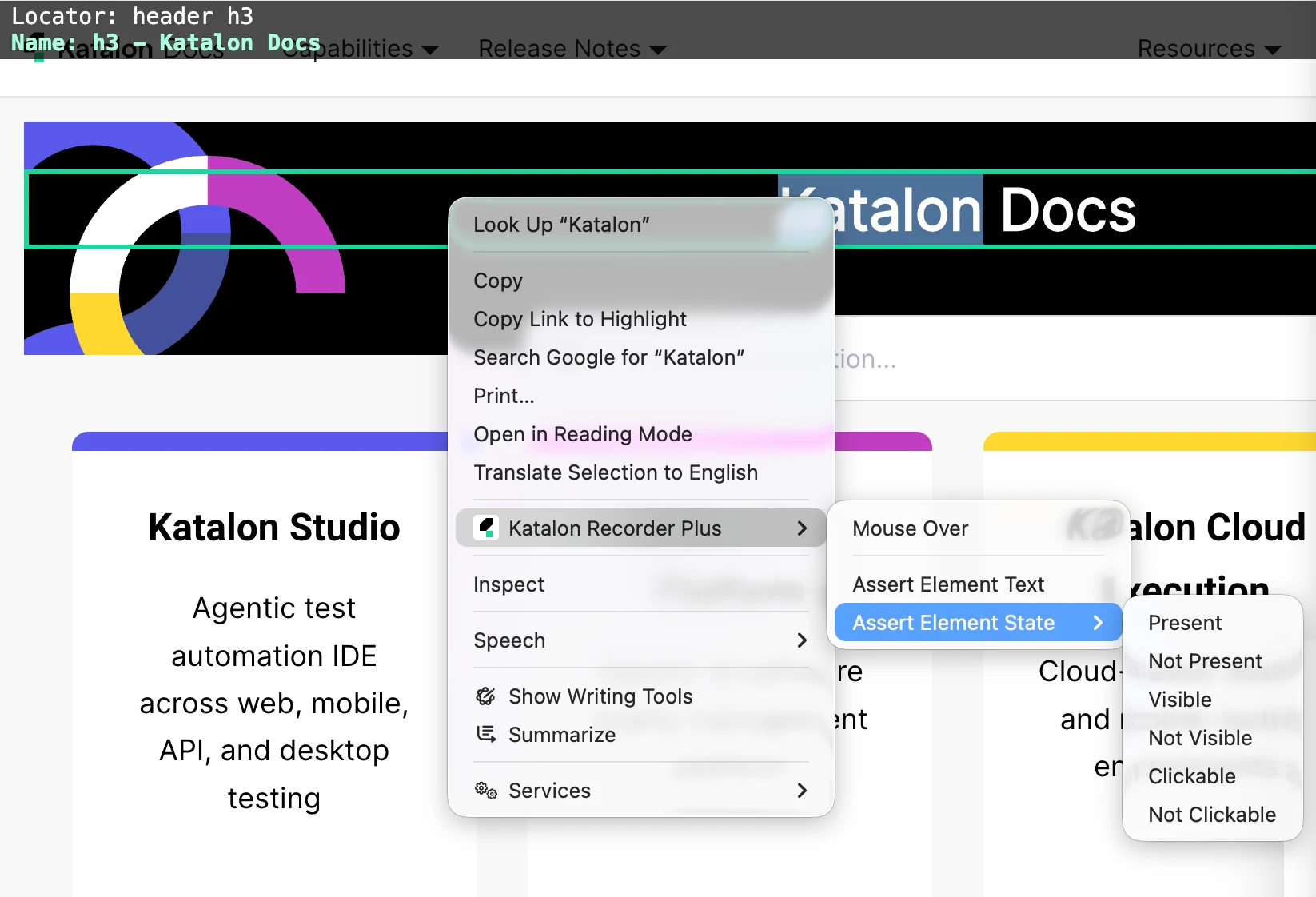
Katalon Studio adds the matching assertElement* step to your test case, for example assertElementVisible or assertElementText.
The recorder menu covers the states above. To check other states, such as checked or attribute values, edit the recorded step or add the keyword in the script.
Move from verify and waitFor keywords
The verify* and waitFor* keywords are still supported. There is no need to rewrite working tests. Use the new keywords in new tests, and switch to them when you edit existing ones.
Before you switch a step, check whether it relies on self-healing. The new keywords do not use self-healing, so a step that passes today only because a broken locator was healed fails after you switch. Fix the locator first, or keep the verify* or waitFor* keyword for that step. See Self-healing.
| If your script does this... | Use this instead |
|---|---|
verifyElementPresent(to, t) as a checkpoint | assertElementPresent(to, t) |
verifyElementVisible(to, t, FailureHandling.OPTIONAL) inside an if | isElementVisible(to, t) |
verifyElementClickable(to, t, FailureHandling.OPTIONAL) inside an if | isElementClickable(to, t) |
if (!WebUI.verifyElementPresent(...)) { KeywordUtil.markFailed(...) } | assertElementPresent(to, t) |
waitForElementNotPresent(to, t) to wait for something to disappear | assertElementNotPresent(to, t) |
waitForElementNotVisible(to, t) for an element that is hidden, not removed | assertElementNotVisible(to, t) |
waitForElementVisible(to, t) right before click | Often not needed, because click already waits |
verifyElementText(to, expected) | assertElementText(to, expected, t) |
The isElement* and assertElement* keywords take a timeout. verifyElementText does not. When you switch, choose a timeout that matches how long the text normally takes to update.
The legacy Mobile verify* and waitFor* keywords remain supported. Switch a step when you edit it, after checking whether it relies on self-healing.
| Existing Mobile check | New keyword |
|---|---|
verifyElementExist(to, t) checkpoint | assertElementPresent(to, t) |
waitForElementPresent(to, t) used for branching | isElementPresent(to, t) |
verifyElementNotExist(to, t) | assertElementNotPresent(to, t) |
verifyElementVisible(to, t, FailureHandling.OPTIONAL) used for branching | isElementVisible(to, t) |
verifyElementNotVisible(to, t) | assertElementNotVisible(to, t) only if the element must exist |
verifyElementChecked(to, t) | assertElementChecked(to, t) after validating the target driver |
verifyElementHasAttribute(to, name, t) | assertElementHasAttribute(to, name, t) |
verifyElementAttributeValue(to, name, value, t) | assertElementAttributeValue(to, name, value, t) |
verifyElementText(to, expected) | assertElementText(to, expected, t) |
The new keywords poll until the timeout; legacy verify* keywords check state after finding the element. Legacy verifyElementNotVisible passes when the element is missing, while assertElementNotVisible fails. The new keywords do not self-heal. verifyElementText has no explicit timeout, so choose one when migrating. Use isElement* if the old return value controls a branch.
Use the keywords in Katalon Studio
Find the Mobile keywords in Built-in Keywords > Mobile > Element. Add them to a test case or choose them through the Mobile Recorder keyword picker. The recorder does not have a dedicated assertion menu for them.
Troubleshooting and known limitations
Web
- Smart Locator and image locator (Katalon Studio 11.2.0 to 11.5.0): when a test object uses Smart Locator or image locator as its default locator,
assertElementPresentcan fail on an element thatverifyElementPresentfinds, for example an element under an overlay. This is fixed in Katalon Studio 11.6.0. We recommend upgrading to 11.6.0 or later. If you can't upgrade yet, set a different default locator, such as XPath or CSS, for that test object. assertElementNotVisiblefails even though the element is gone. The element was removed from the page, so there is nothing to evaluate. UseassertElementNotPresentinstead. See Negative states need the element to exist.- My test got slower after switching to
isElement*. Check the timeouts onisElement*checks that often returnfalse. Eachfalseresult waits for the full timeout. assertElementTextfails, but the text looks right. The match is exact, including spaces and letter case. Check for leading or trailing spaces, line breaks, or hidden characters. For flexible matching, usegetTextwithverifyMatch.assertElementNotClickablepasses on an element covered by an overlay. That is expected. An element covered by another element is not clickable, because it is not on top.- A step passed with
verify*orwaitFor*, but fails after switching toassertElement*. The old keyword probably found the element through self-healing. The new keywords do not use self-healing. Check the self-healing log for that test object and update its locator, or keep the old keyword for that step. See Self-healing. - An
isElement*keyword fails the step instead of returningfalse. The keyword hit an unexpected error, such as an invalid locator or a closed browser, not an unmet condition. Check the test object locator. To keep the test running, passFailureHandling.OPTIONALorFailureHandling.CONTINUE_ON_FAILURE; the keyword then returnsfalse.
Mobile
assertElementNotVisiblefails after the element disappears. UseassertElementNotPresentwhen removal is the expected state.- An
isElement*step fails instead of returningfalse. Check for an invalid or wrong-platform locator, a driver/platform mismatch, or an application that has not started.flowControlgoverns unexpected errors. - A migrated check behaves differently. Check for self-healing in the old step, a missing element in a negative-state check, and the new polling timeout.
assertElementTextfails although the text looks right. Text matching is exact; check whitespace and case. For partial matching, get the text and compare it in your script.- Checked state on iOS. Update to 11.7.0 or later for checked-state support on
UISwitchcontrols. If another iOS control does not expose a checked state, inspect its available attributes and check the relevant value instead. - Hybrid app WebView. The keywords use the active driver context. Switch to the appropriate context before checking a WebView element; behavior for these keywords in WebView has not been verified.