How to overcome Katalon Runtime Engine long path issue on Windows
This document explains a work-around to the Katalon Runtime Engine long path issue on Windows machines.
Issue
The Katalon Runtime Engine long path issue on Windows is found when using Katalon Studio and Katalon Runtime Engine version 10.2.0 and later. This issue causes occasional execution failures when executing test cases, test suites, or test suite collections, specifically on Windows machines.
When it occurs, you may see one of the following errors:
Error 1: Path length limitation
Example:
Package path is too long C:/Users/sample/.katalon/10.3.2/Katalon_Studio_Engine_Windows_64-10.3.2/.
Please shorten the package path to stay within Windows command length limits.
Error 2: Test run terminated without detailed logs
Example:
2025-10-13T09:55:23.0816398Z Launcher status after execution process completed: Terminated
Root Cause
From version 10.2.0 onward, Katalon Studio/Katalon Runtime Engine uses a new StandardVMRunner (org.eclipse.jdt.internal.launching), which auto-generates a temporary classpath argument file with all required classpaths for execution.
In some environments, the path of this temp file exceeds 255 characters, which is Windows' maximum supported file path length. This prevents Windows from processing the file properly, resulting in execution failures.
Solution
Katalon is aware of this issue and is actively working on a permanent fix. In the meantime, these are temporary workarounds you can apply:
Workaround 1
Manually install Katalon Runtime Engine with the “Pre-installed” Katalon Runtime Engine option
Pre-install Katalon Runtime Engine option allows you to allocate a more surface folder for Katalon Runtime Engine, hence shortening the path length of the temporary files as they are created during executions.
-
Manually download the desired Katalon Runtime Engine version from Katalon Releases.
-
Place the Katalon Runtime Engine folder in a short directory path, and copy this path for later use. For example:
C:/Users/KRE_10.3.2
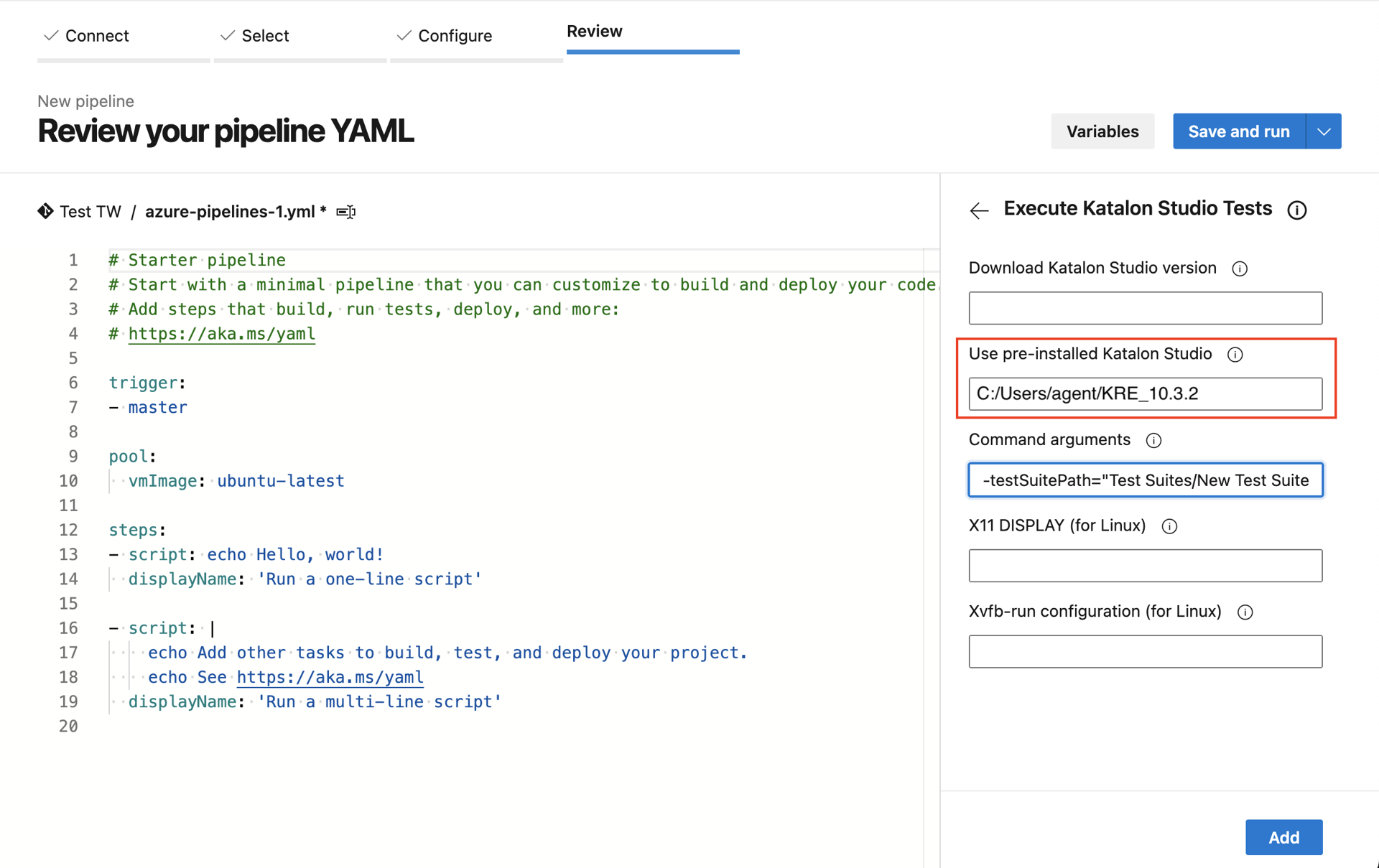
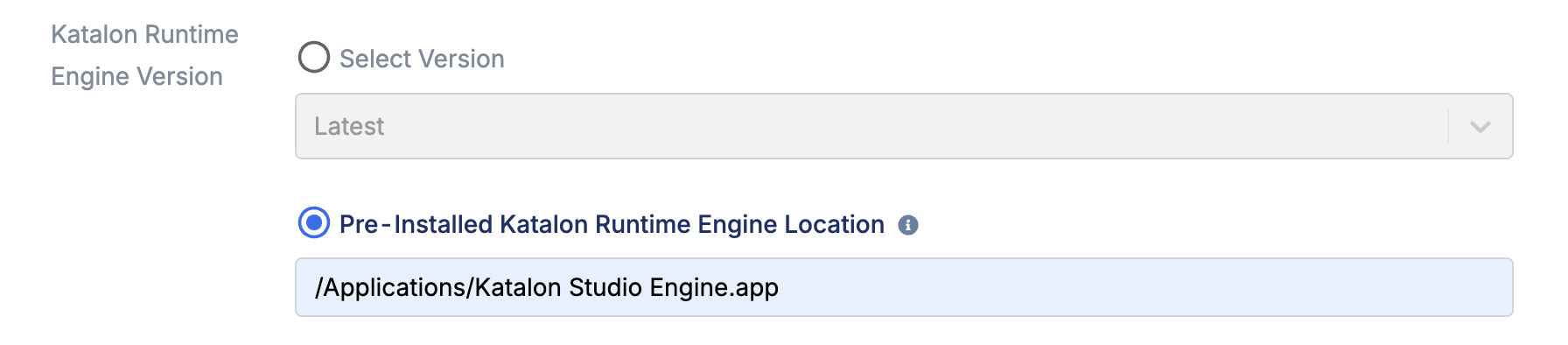
When executing Katalon Runtime Engine in Azure DevOps or TestOps, you are asked to specify a Katalon Studio version and the path to Katalon Runtime Engine. Leave the version blank, and use the path in step 2 for Katalon Runtime Engine.
- Save the configuration and re-run your test.
Example configurations
With Azure DevOps:
With local agent in TestOps Legacy:
Workaround 2
Manually Download and Install Katalon Runtime Engine using CI (with Github Action sample)
Similar to workaround 1, this method manually selects an installation path to keep the temp file paths short.
- Katalon Runtime Engine 10.2.x or later.
- You are using GitHub Actions, Azure DevOps, or another Windows-based CI environment.
Below is a masked sample workflow for Github Actions, demonstrating how to manually download Katalon Runtime Engine and execute tests using a short installation path.
- Copy and paste the below script (masked sample workflow) in your Github Action
.yamlfile.
Click to view more
name: Full Sanity Test Suite Workflow
on:
  workflow_dispatch:
jobs:
  run-tests:
    runs-on: windows-latest
    timeout-minutes: 420
    steps:
      # Optional: increase screen resolution for UI tests
      - name: Set screen resolution
        run: Set-DisplayResolution -Width 1920 -Height 1080 -Force
        shell: powershell

      # Checkout project source code
      - name: Checkout repository
        uses: actions/checkout@v4

# Download and extract katalon-test-engine-local to a short path
      - name: Download Katalon Runtime Engine
        run: |
          $KRE_VERSION = "<KRE_VERSION>"
          $DOWNLOAD_URL = "https://download.katalon.com/$KRE_VERSION/Katalon_Studio_Engine_Windows_64-$KRE_VERSION.zip"
          $KATALON_DIR = "C:\katalon"
          New-Item -ItemType Directory -Force -Path $KATALON_DIR
          Invoke-WebRequest -Uri $DOWNLOAD_URL -OutFile "$KATALON_DIR\katalon.zip"
          Expand-Archive -Path "$KATALON_DIR\katalon.zip" -DestinationPath $KATALON_DIR -Force
          Remove-Item "$KATALON_DIR\katalon.zip"
        shell: powershell

# Execute tests using the manually installed katalon-test-engine-local
      - name: Run Katalon tests
        run: |
          C:\katalon\katalonc.exe ^
          -noSplash ^
          -retry=0 ^
          -testSuiteCollectionPath="<TEST_SUITE_COLLECTION_PATH>" ^
          -apiKey="<MASKED_API_KEY>" ^
          -testOpsProjectId=<MASKED_PROJECT_ID> ^
          -testOpsReleaseId=<MASKED_RELEASE_ID>
        working-directory: ${{ github.workspace }}
        shell: powershell
- This workflow has the following steps:
- Increase screen resolution for UI tests: this step is optional, setting app UI to
1920 x 1080. - Checkout project source code: The pipeline pulls your Katalon project from the repository so it can be executed in the CI environment.
- Download and extract Katalon Runtime Engine to a short path: replace
<KRE_VERSION>with your desired version. The script installs Katalon Runtime Engine atC:\katalon(edit the path to your desired path). - Execute tests using the manually installed Katalon Runtime Engine: execute the test configured in the script. Replace the masked values with your project's values:
-testSuiteCollectionPath="<TEST_SUITE_COLLECTION_PATH>" ^-apiKey="<MASKED_API_KEY>" ^-testOpsProjectId=<MASKED_PROJECT_ID> ^-testOpsReleaseId=<MASKED_RELEASE_ID>
- Increase screen resolution for UI tests: this step is optional, setting app UI to
The pipeline will execute tests directly using C:\katalon\katalonc.exe
Workaround 3
Downgrade to an earlier version
If you prefer not to manually download and configure Katalon Runtime Engine, you can downgrade to a previous Katalon Studio version earlier than *10.2.x (10.1.x or 9.x...).