"bind(): failed Cannot assign requested address (99)" when running Katalon Docker Image
During test startup or browser initialization, you may encounter the bind() failed: Cannot assign requested address (99) error when executing tests with Katalon Docker Image (KDI), especially in CI environments.
This issue typically occurs for tests that use headless browsers (most commonly Chrome headless) inside Docker containers.
Root Cause
Unlike desktop OS, Docker's environment has networking and resource constraints.
When a test runs in headless browser, headless browser drivers (specifically Chrome/ChromeDriver) require features that may behave unpredictably in Docker's environment, causing network address binding failure.
Solution
To resolve this issue, we need to turn off these features by configuring desired capabilities for the browser, and use a Test Listener to relax ChromeDriver IP restrictions.
Follow these steps:
Step 1: Configure Desired Capabilities for the target browser
- Go to Project > Settings > Desired Capabilities > WebUI.
- Choose the browser you are running inside Docker (for example: Chrome, Chrome (Headless)), and add these arguments:
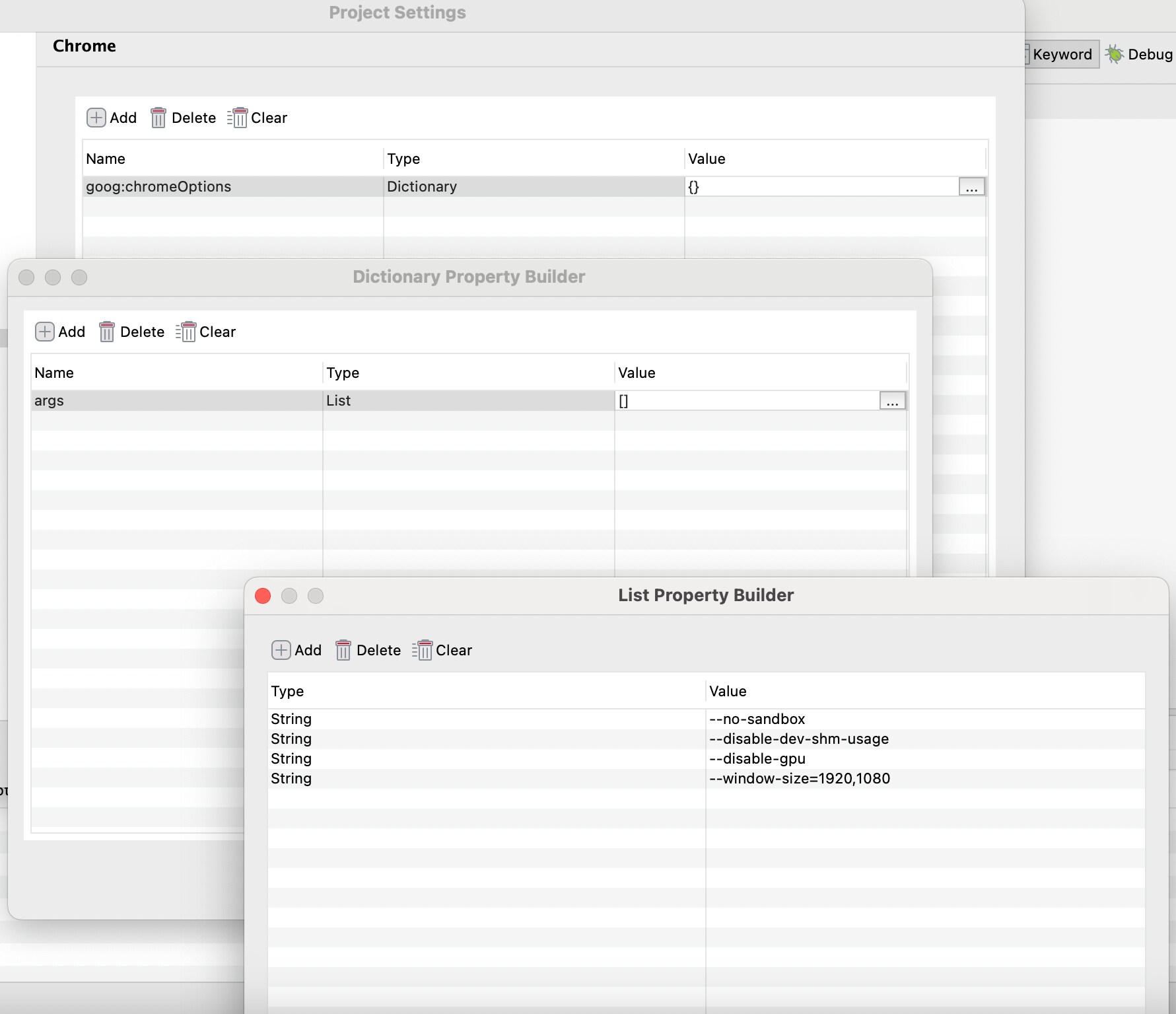
| Name | Type | Value |
|---|---|---|
| goog:chromeOptions | Dictionary | Click ... to add value in table 2 below. |
| Name | Type | Value |
|---|---|---|
| args | List | Click ... to add value in table 3 below. |
| Type | Value |
|---|---|
| String | --no-sandbox |
| String | --disable-dev-shm-usage |
| String | --disable-gpu |
| String | --window-size=1920,1080 |
These arguments address common Docker-related issues:
--no-sandbox: Prevents sandbox-related permission errors inside containers.--disable-dev-shm-usage: Avoids crashes caused by limited shared memory (/dev/shm) in Docker.--disable-gpu: Disables GPU acceleration, which is not available in most Docker environments.--window-size=1920,1080: Ensures a stable and predictable browser viewport for test execution.
Step 2: Add a Test Listener to relax ChromeDriver IP restrictions:
- In Katalon Studio, right-click Test Listeners > New > Test Listener
- Add the following script:
import com.kms.katalon.core.annotation.BeforeTestSuite

@BeforeTestSuite
def beforeTestSuite() {
    System.setProperty("webdriver.chrome.whitelistedIps", "")
}
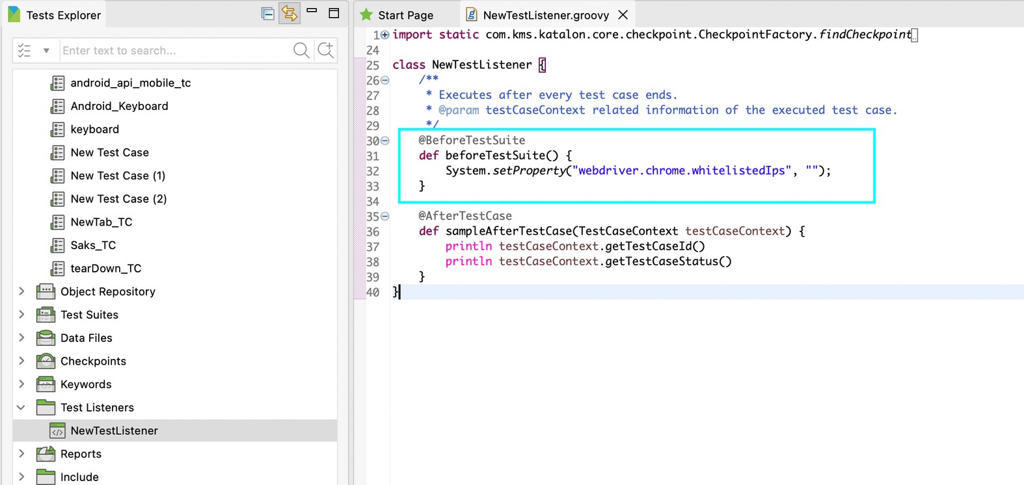
ChromeDriver may restrict connections to specific IP ranges, which can cause issues in containerized or dynamically assigned network environments. This configuration allows ChromeDriver to accept connections from any IP address, which is essential when running inside Docker containers or CI runners.
Step 3: Re-run your test
Rebuild and re-run your test execution using Katalon Docker Image.
In most cases, applying both:
- the browser arguments, and
- the
webdriver.chrome.whitelistedIpssetting
will fully resolve the bind() failed: Cannot assign requested address (99) error.