Configuring idle timeout for remote TestCloud sessions
Last updated: June 2026
Your test execution sessions sometimes disconnect when your tests pause for non-UI activities such as email polling, file downloads, or backend API calls. The idleTimeout desired capability lets you extend the session idle duration to prevent premature disconnection.
This guide explains how to configure idleTimeout for Test Execution - Cloud sessions.
note
- Platform: Linux is not supported.
- Default: If you do not explicitly set
idleTimeout, the default is 90 seconds.
Configure idle timeout in an execution profile
Configure idle timeout at the profile level to apply it to all test cases executed with that profile.
-
In Katalon Studio, go to Project > Settings > Desired Capabilities and select Test Execution - Cloud.
-
In the settings table, add the
katalon:optionsproperty and set the Type as Dictionary.- In the Value column, add the
idleTimeoutcapability with Number value type, then specify a value between90and900seconds.
- In the Value column, add the
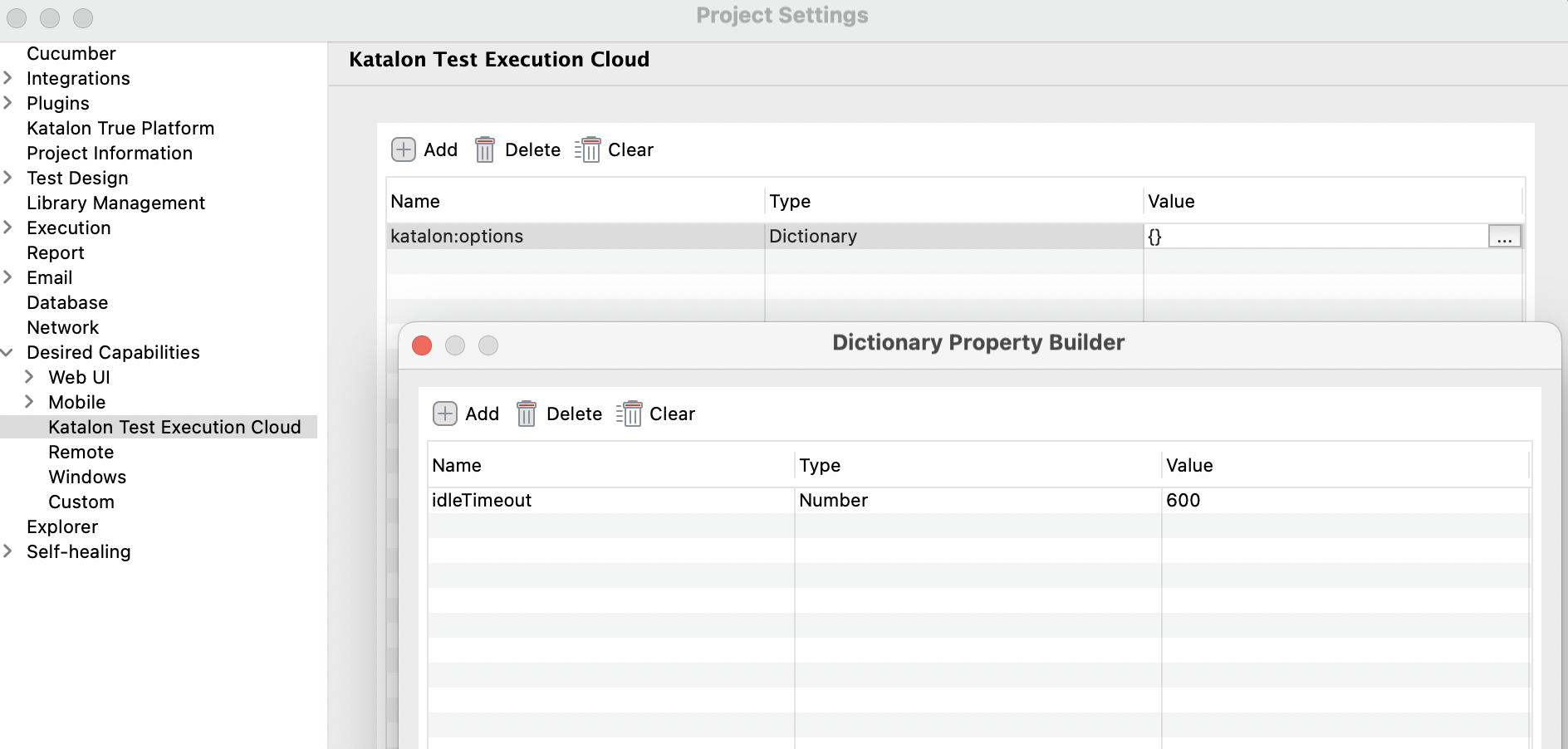
-
Click OK and Apply & Close to save the settings.
-
Configure your cloud environment and run the test.