Integrate Jenkins Pipeline (Jenkinsfile) with Katalon Studio Docker Image
This tutorial explains how to integrate a Jenkins Pipeline (Jenkinsfile) with the Katalon Studio Docker Image. This image contains up-to-date browsers, including Google Chrome, Mozilla Firefox, and Katalon Studio.
Using the Katalon Studio Docker Image, you don't need to install Katalon Studio and Katalon Runtime Engine on your local machine.
Find Katalon Studio Docker Image at Docker Hub.
- Jenkins installed. Follow the instructions in this Jenkins document for installation: Installing Jenkins.
- Docker installed. For installation details, see Get Docker.
- An active Katalon Runtime Engine floating license. To learn more about types of licenses, refer to this document: Katalon Runtime Engine floating license.
Integrate Jenkins with Docker
To integrate with Docker on Jenkins, you need to install the Docker plugin and Docker Pipeline, then set an environment path to Jenkins. Do as follows:
- Install plugins.
- Open Jenkins, then go to Dashboard > Manage Jenkins > Manage Plugins.

- The Plugin Manager page appears. In the Available tab, search for Docker plugin and Docker Pipeline, then select them.

- Open Jenkins, then go to Dashboard > Manage Jenkins > Manage Plugins.
- Add an environment path.
To run Docker commands from Jenkins, you need to add an environment path to Jenkins. The
PATHspecifies where to find the folder containing Docker commands.Go to Dashboard > Manage Jenkins > Configure System > Global properties. Select the Environment variables to add a global variable named
PATH+EXTRAwith this value:usr/local/bin. Note: To find the correct Docker installation path, open Terminal, copy and paste the following command line:
which docker. The result will tell you where the Docker is.
Upload your Pipeline script
Make sure you have Docker open, with Docker plugin and Docker Pipeline activated on Jenkins.
- In the Jenkins Dashboard, go to New Item and create a Pipeline project.

- In the Definition dropdown list, choose between Pipeline script or Pipeline script from SCM, depending on where you store your Jenkinsfile.The Pipeline script from SCM instructs Jenkins to obtain your Pipeline from Source Control Management (SCM), which will be your locally cloned Git repository. To learn more about defining a Pipeline, you can refer to this Jenkins document: Getting started with Pipeline.
Here, since we have our Pipeline project stored in Git, we select Pipeline script from SCM.

- In the SCM field, select Git.Enter your repository URL, select branches to build, repository browser, and additional behaviors, if any.
Go to CI samples to clone and download the following sample project.

- Go to your Jenkinsfile in your Github repository, click (...) > Copy path to get the script path.

- Specify the Jenkinsfile path from your Git project in the Script Path box.

You can see our sample Jenkinsfile for MacOS/Linux. In case you are using Windows, replace the
shcommand in this sample Jenkinsfile with thebatcommand:
For example, we want to run the TS_RegressionTest test suite from the CI samples project with the Chrome browser in Windows. We adjust the sample Jenkinsfile as follows:steps { bat '' }pipeline { agent any stages { stage('Test') { steps { dir('/Users/<user_name>/Downloads/ci-samples-master'){ bat 'docker run -t --rm -v "$(pwd)":/tmp/project katalonstudio/katalon katalonc.sh -projectPath=/tmp/project -browserType="Chrome" -retry=0 -statusDelay=15 -testSuitePath="Test Suites/TS_RegressionTest" -apiKey=<your-api-key>' } } } }Note:After cloning our sample Jenkinsfile to your repository, customize the below command lines for your purposes:
<your-project-folder>: the direct path to your project folder in the local machine.<your_API_Key>: the API key verifies your credentials. The command-line options of API Key, including-apiKey=<Your_API_Key>and-apikey=<Your_API_Key>are both accepted. To learn more about API keys, see Katalon API Key in Katalon True.- If you belong to more than one Organization subscribing to Runtime Engine licenses, you can choose which Organization validates your license usage with the following command line:
-orgID=<Katalon_OrgID>.
Build your project
- Click Save, then click Build Now to run the Jenkinsfile.
While the test is being run, if Docker cannot find the
katalonstudio/katalonimage locally, it will automatically pull this image.
- To view the console log, click on your current build on Jenkins and select Console Output.

You can also view the console log in Docker during the test.
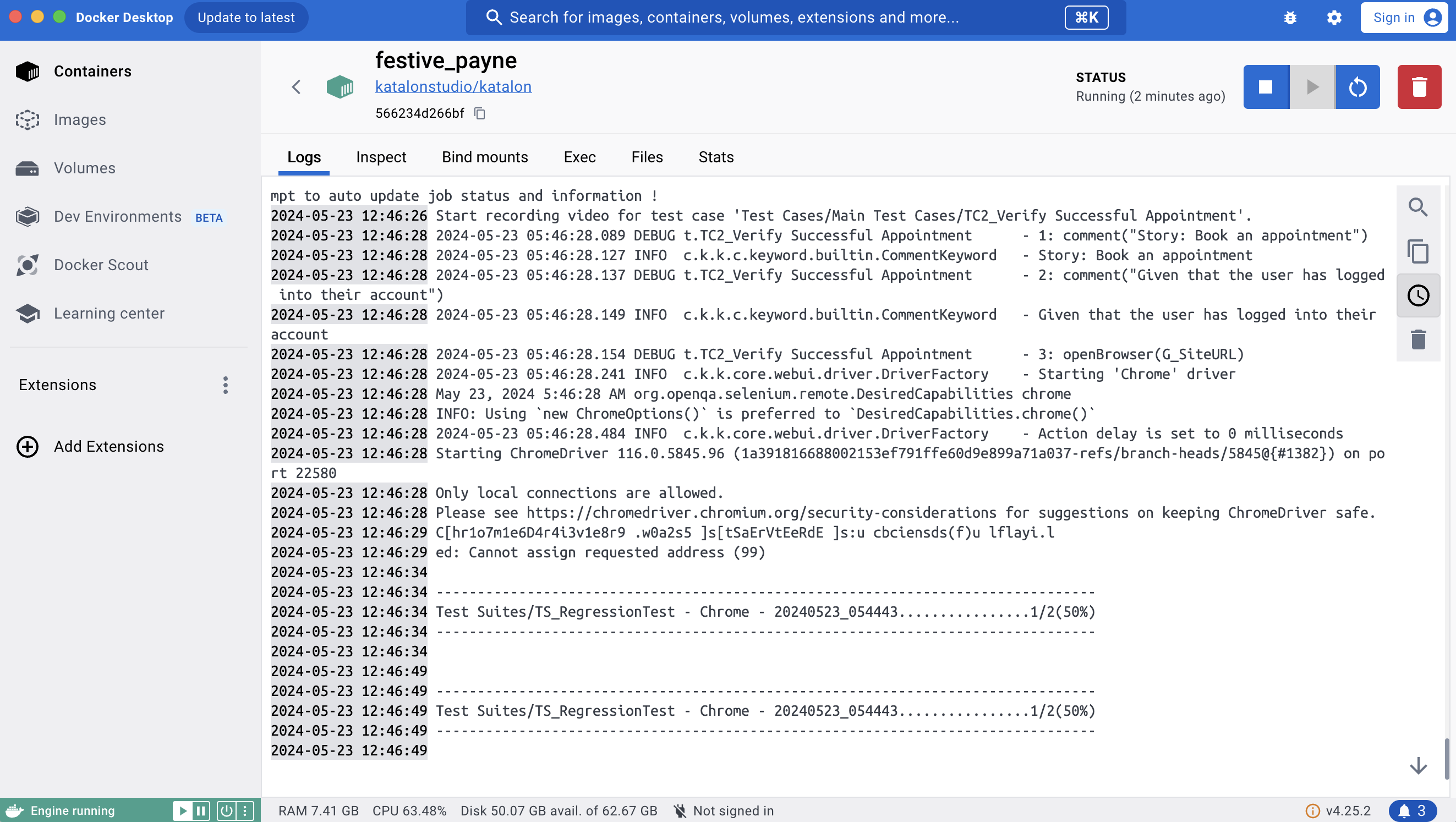
To view your report files, you can go to this directory:
<your-project-folder>/Reportsor your third-party integration like Katalon True, Azure DevOps, or qTest. Katalon Studio supports exporting test reports in HTML, CSV, PDF, and JUnit.Note: To display characters with UTF-8 encoding in test reports, you can specify theSee also Integrate Jenkins on Docker hosted in Ubuntu.-Dfile.encoding=UTF8argument in thejenkins.xmlfile.