Analyze requirement traceability
This document explains how to visualize and analyze relationships between requirements, test cases, test executions, and defects with the Requirement Traceability Report in Katalon True Platform.
For linkages to appear, make sure there are:
- Requirements loaded from ALM integration (Jira or Azure DevOps).
- Test cases linked to requirements. See Linkages for more details.
- Test executed in the selected time frame or iteration (sprint/release).
- Defects linked to test results, for a complete traceability chain.
Overview
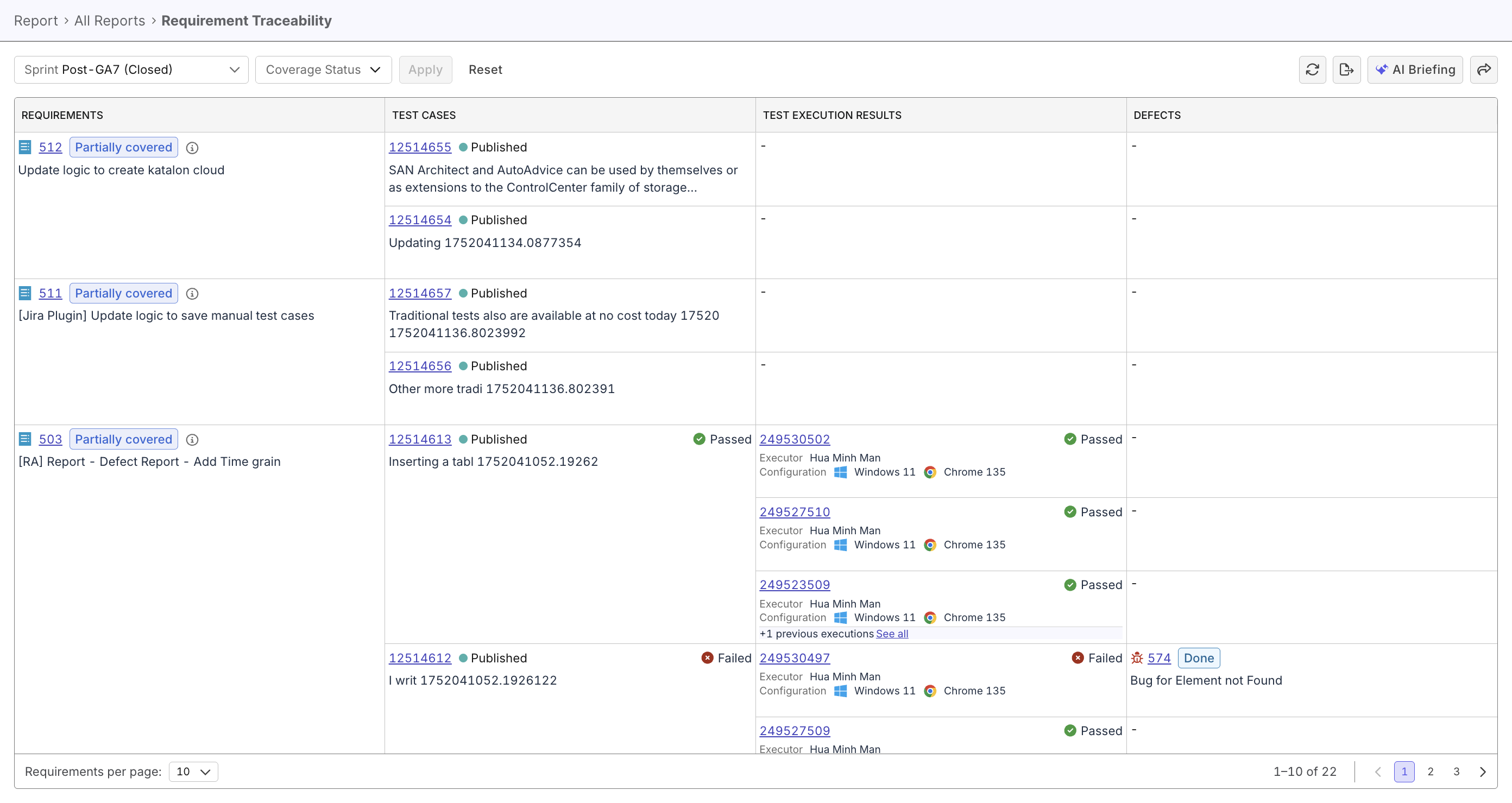
The Requirement Traceability Report provides a complete view of the relationships between requirements, test cases, test executions, and defects—creating an end-to-end traceability chain essential for quality gap analysis and compliance audits.
| Relationship | Type |
|---|---|
| Requirements ↔ Test Cases | Many-to-many (one requirement can have multiple test cases, one test case can validate multiple requirements) |
| Test Cases → Test Executions | One-to-many (one test case can be executed multiple times) |
| Test Executions → Defects | One-to-many (one failed execution can identify multiple defects) |
The report can be used as compliance evidence for FDA 21 CFR Part 11 or ISO 13485, proving the product has been thoroughly tested.
Steps to analyze requirement traceability
From the Katalon True Platform sidebar, go to Analytics > Reports > Requirement Traceability Report.
Once you've accessed the report, follow these steps to analyze requirement traceability.
Step 1: Select your analysis scope
The traceability report supports two analysis scopes, each serving different audit and analysis needs.
| Scope | Use case |
|---|---|
| Current | - Shows the most recent execution result for each test case - Point-in-time snapshot of current test status - Ideal for identifying currently untested requirements - No time boundaries—focuses on latest status |
| Release-Based | - Analyzes all test executions associated with a specific release or sprint - Time-bounded analysis tied to software version - Ideal for release-specific compliance documentation - Shows testing performed for a particular software version |
Step 2: View traceability matrix
The matrix should display:
| Requirements | Test Cases | Test Execution Results | Defects |
|---|---|---|---|
| Requirement synced from ALM, showing requirement ID, name, and coverage status | Test case linked to requirement, showing test case status (Published, Draft) and latest execution status (Passed, Failed, Not Run) | Breaking down test cases' past results and link to each result | Defects synced from ALM and linked to the particular test case/result, with defect ID, summary, status (Open, Closed) |
From the matrix, identify coverage gaps, and allocate efforts to have all requirements fully covered.
Before navigating the matrix manually, ask Katalon AI Assistant to summarize coverage gaps, missing linkages, or defects that need follow-up.
Step 3: Share/Export Traceability Matrix for Audits
For compliance documentation, regulatory audits, or stakeholder reporting, export the traceability matrix to CSV format that contains:
- All visible requirements (based on filters)
- Linked test cases for each requirement
- Execution status and results
- Linked defects and their status
- Timestamps and metadata
Or, you can share the report for a live, non-static view.