Analyze configuration coverage
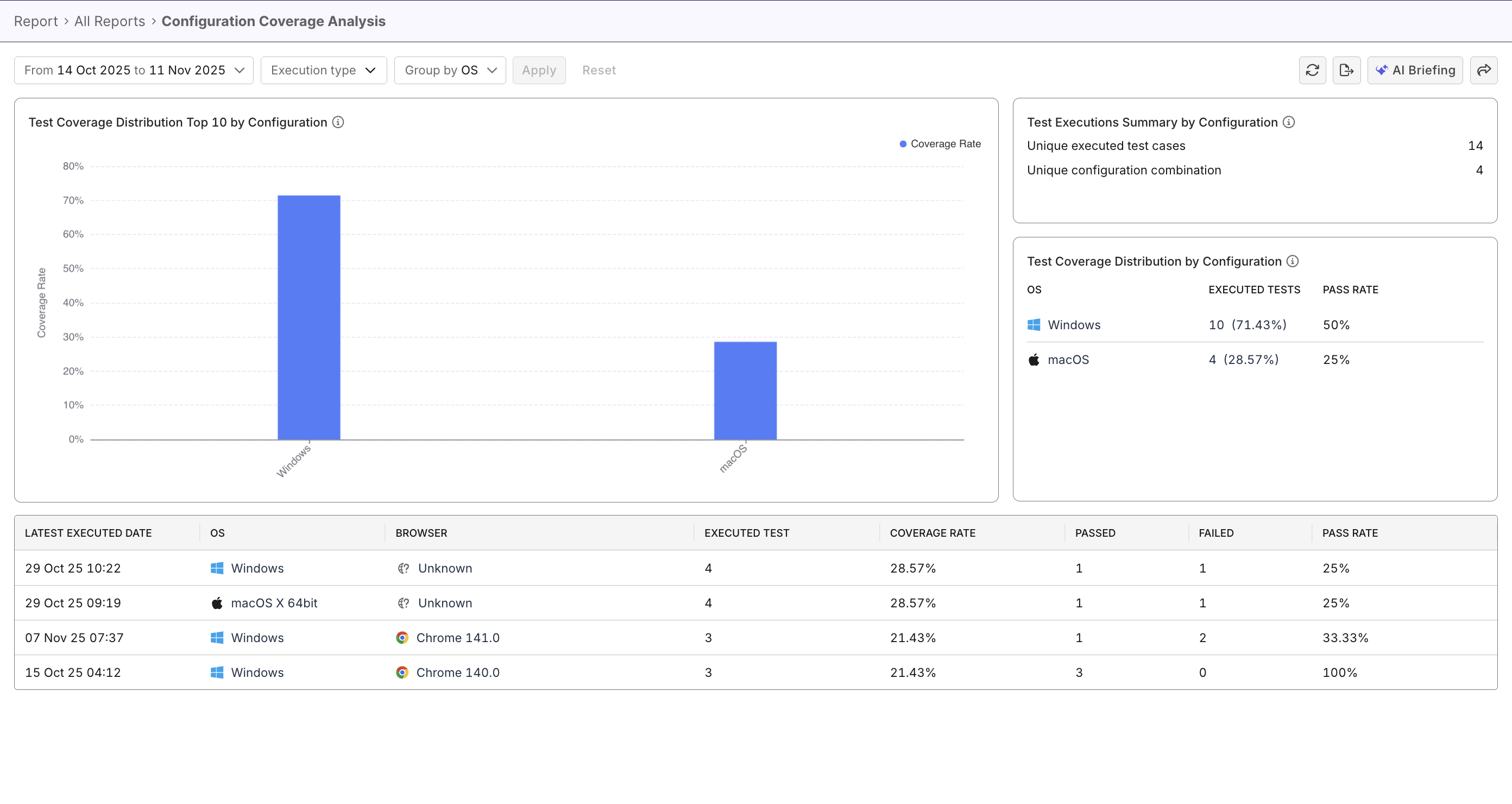
This document demonstrates how to analyze your project’s test coverage across operating systems and browsers, using Katalon True Platform capabilities.
- At least 1 executed test within the selected time range or release/sprint
Overview
To ensure reliable delivery, it's good practice to ensure comprehensive testing across operating systems, browsers, and platform configurations. The Configuration Coverage Report helps you identify untested configurations and re-prioritize testing efforts.
Steps to analyze configuration coverage
In Katalon True Platform, you can access the Configuration Coverage Report through multiple routes:
- Via the Analytics & Trends Dashboard: the Test Coverage by Configuration widget can be expanded to navigate to the Configuration Coverage Report.
- Via Analytics > Reports > Configuration Coverage Report.
Once you've accessed the report, follow these steps to analyze configuration coverage.
Step 1: Select a data scope
Select a date range or release/sprint to define the data scope for your analysis.
Step 2: Select grouping and filters
Choose grouping and filters that map directly to your analysis objective. For example:
| Use case | Steps |
|---|---|
| Evaluate testing breadth and depth | - View statistics summary, check Unique Test Cases (depth) and Unique Configuration Combinations (breadth). - Assess if testing is sufficiently distributed across configurations. |
| Validate cross-browser/os testing | - Group data by Browser or Operating System (OS). - Identify browsers/operating systems with lower coverages, and prioritize testing efforts. |
| Analyze specific configuration performance | - Choose grouping strategy (OS, Browser, or OS & Browser). - Click a bar in the chart to filter data. - Review the data table for low configuration coverage, and allocate efforts on additional testing. |
| Compare automated vs manual testing contribution | - Group data by Browser or Operating System (OS). - Apply filter: Automated then Manual, to compare coverage differences between execution types. - Identify gaps where automation is lacking and allocate efforts on automation. |
Quickly spot under-tested configurations by asking Katalon AI Assistant which browsers, operating systems, or configuration combinations need more coverage.