Analyze test run patterns
This document explains how to use the Test Runs Analysis Report to view and analyze test run patterns across a specific period.
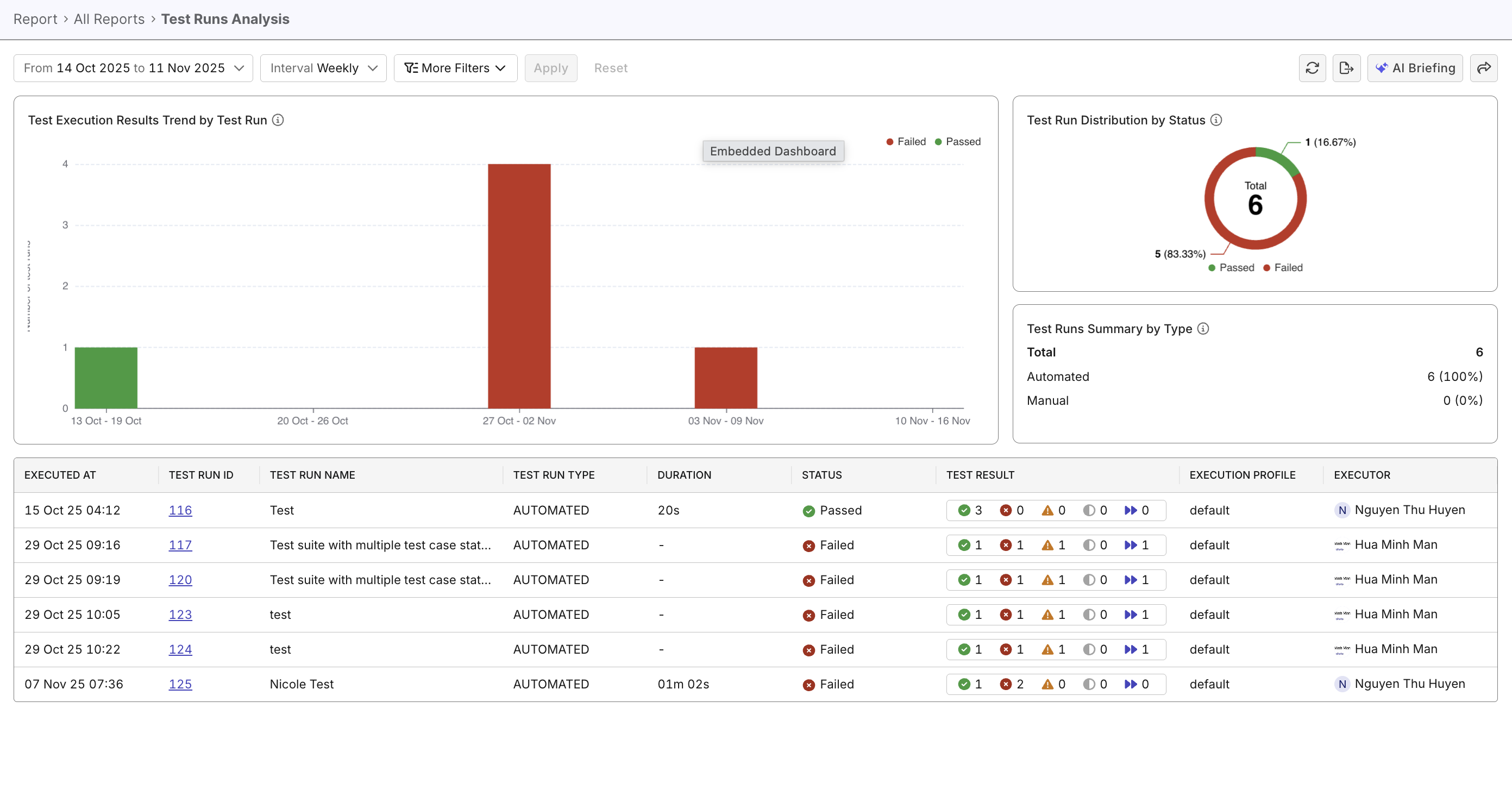
Overview
Analyzing test run patterns helps you spot regressions, measure stability, and prioritize test and infrastructure work. The Test Runs Analysis Report consolidates trends, distributions, and run-level details so teams can quickly triage issues and plan corrective actions.
Steps to analyze test run patterns
In Katalon True Platform, you can access the Test Runs Analysis Report through multiple routes:
- Via the Analytics & Trends dashboard: the Test Execution Results Trend by Test Run widget can be expanded to navigate to the Test Runs Analysis Report.
- Via Analytics > Reports > Test Runs Analysis Report.
Once you've accessed the report, follow these steps to analyze test run patterns.
Step 1: Configure data scope and intervals
Pick a scope that matches your goal:
- Short-term triage: last 7/14/30 days, group by day — for immediate troubleshooting and identifying recent failures.
- Sprint review: select a sprint (or 1–2 sprints) and group by day — inspect day-by-day stability across the sprint.
- Release / time-period analysis: choose a multi-week or multi-month window (4–12 weeks or 1–3 months) and group by week — use for broader quality trends.
Step 2: Apply filters to narrow down data
Apply filters to slice the data. For example:
- Run Type (Automated / Manual): compare stability and ROI of automation
- Test Suite/Test Case: drill into the tests that contribute most failed results or flakiness.
- Executor: identify patterns in training gaps, mistaken test selections, or repeated operator-caused failures...
- Status (/
Failed/Incomplete...): focus on failing/incomplete runs for failure investigation. - Custom filters: See Customizable Fields to learn how to create these fields. Fields like Environment (staging/prod/qa) or Profile help compare runs across different environments or test profiles to uncover unexpected trends.
Step 3: Analyze patterns and signals
Once data is scoped and filtered, look for patterns that suggest systemic issues or regression issues. For example:
| Type | Examples |
|---|---|
| Systemic & Infrastructure Issues | - Broad failures across many tests: likely API/service outage or major change. - Many incomplete runs (still in progress) on the same day: CI/agent instability or environment outage. - High failed count + long duration: cascading failures or problematic infrastructure. |
| Feature & Regression Issues | - Repeated large failed segments: persistent regression/bad change. - Failed runs with many skipped tests: missing preconditions, disabled features, or test-data problems. - Failures concentrated in a specific test suite: focused feature regression should be prioritized. |
See Investigate failures to learn more about investigating failures.
For a quick readout of suspicious run-level patterns, try asking Katalon AI Assistant what trends or anomalies deserve deeper investigation.